Blog
Product updates and practical playbooks for modern teams
Stay updated on releases, learn best practices, and explore how partners and modern teams structure work.
Search...

·
Author
Introducing AI Coaching: Practice the Calls Your Team Keeps Losing
The short version: AI Coaching is live in Salesfinity. Every rep gets a short plan for today on their biggest gap to the top of their team: hear how a teammate handled it on a real call, practice it on a short call with an AI prospect, then use it on the next real call. Managers see where the team is losing calls and hand out the practice that fixes it in a few clicks. It replaces AI Training, on Gold, Enterprise and Enterprise+.
Alex's plan for today: hear how Maya got past "Just send me an email", practice it for 3 minutes, then use it on the next calls. All names and numbers are made up.
Same objection, same lost call
Every rep knows the moment. The prospect says "just send me an email", you say "sure", and the call is over. It happens again on Tuesday, and on Thursday. Somewhere on your team, someone gets past that line and books the meeting, but nobody has time to listen to every call and tell you what they say.
AI Coaching does that listening for you. It works from your scored calls (by default, calls over a minute that a person answered). As they add up, it learns your biggest gap, who on your team does it best, and which real moment to play you, and turns that into a few minutes of practice before your next call.
For reps: a plan for today
Open Coaching in your sidebar and you land on My coaching. The first time you open it each day, it builds Your plan for today, usually three steps:
Hear it. A short clip of a teammate doing it on a real call, cut around the moment that worked.
Practice it. A short practice call picked for that skill or objection, usually a few minutes.
Use it. Ari listens for it on your next real calls and tells you how it went, right on the card: You got past it on 2 of 3 calls today. Nothing to click.
The focus is the skill with the biggest gap between you and the top of your team on real calls over the last 30 days. When that's handling objections, it narrows to the objection that ended most of your calls this week. Until you have 10 scored calls of your own, the plan starts from the objection ending most of your team's calls, and it says so. If a training plan is due within 3 days, its next practice call comes first.
See where you stand
Once you have 10 scored calls, Where you stand on real calls puts every skill on one line: you, the team average and the top rep on your team, biggest gap first. Pick a skill to see What Maya does that you don't in plain numbers, like how often she gets past the objection or asks a question right after hearing it, with her clip one click away.
Handling objections is Alex's biggest gap: 62 next to a team average of 70 and Maya's 84.
Above it, Your week, next to your team shows conversations, meetings booked, the share of conversations that became meetings, and the days you practiced, each next to your team's average and its best number. Practice two working days in a row and a streak shows up in the header.
Practice calls that sound like your prospects
A practice call is a live voice conversation with an AI prospect. You get a brief first (who they are, your goal and what you're scored on) and the screen says it plainly: Practice only. No real call is made. Prospects come in four levels: Easy, Normal, Hard and Very hard. On Hard they push back twice and hang up if you pitch for about 30 seconds without asking anything.
The Practice tab has three kinds:
Your team's, built by your manager.
Salesfinity built-ins, like The first 10 seconds, Get past the front desk, "Just send me an email", Leave a 30-second voicemail and The first 3 seconds after a connect for parallel dialing.
From your team's calls: prospects rebuilt from real calls, with the tone, objections and pain points they actually had.
You can also practice the call you just lost. Open it in Call history and click Practice this call, or use the card the Dialer shows after a call of 30 seconds or more that you log as Not interested or Do not call again. Ari plays that prospect with what they actually said. During a dialing session, the card saves the call so you can practice it when the session ends.
And before you start dialing, the Dialer can offer a warm-up of up to 3 minutes, picked from how your calls went wrong the day before or from today's plan. It shows at most once a day, and you can skip it.
Feedback, usually in under a minute
Hang up and you go straight to your feedback. No star ratings, no forms. It usually lands in under a minute:
A score against the score to pass, 75 unless your manager set another.
How each part went on the skills that practice call is about.
Moments to look at: up to three moments from your own call, each with what they said and what you said. The ones to fix come with Try saying and a better line.
Redo from here restarts the call at that moment. The prospect picks up from their line, and only what you say from there is scored.
Alex's first try scores 68. One fix, Redo from here, and the second try passes at 81.
Practice is private. Your manager sees how often you practiced and your best score on each training-plan step, and hears an attempt only when you submit it.
For managers: coach the whole team in minutes
See where the team is losing calls
Owners and admins land on Team. It shows who practiced this week, the team score on real calls, and Skills on real calls: every rep against every skill once they have 10 scored calls, colored by score, with practice this week and the trend. Click a score to open that rep's calls, lowest on that skill first.
When a pattern shows up, Ari suggests flags it above, like Four reps keep losing calls at "Just send me an email", a rep who stopped practicing while a skill slipped, or a call worth sharing with the team. Each card has the button to act on it, and nothing reaches your reps until you click it.
Taylor turns Ari's suggestion into a practice call and assigns it to the four reps who lost those calls.
Turn one sentence into a practice call
Click New practice call and describe the prospect and what the rep should get out of the call:
A busy VP of Operations at a 300-person logistics company. Uses the email line to get off every call. The rep should book a 15-minute call.
In up to 10 seconds Ari drafts the whole thing: the prospect, the situation, the goal and the objections your team actually hears, each with a count like heard on 14 calls. You can also start from a real call or from a contact in your lists. Change anything, try the call yourself, then Save to Practice.
When an objection comes up on 10 or more of your team's calls in a week and no practice call covers it, the Practice tab flags it, with one button to draft them all for you to review.
Training plans and certificates
A training plan is a short list of steps: clips to listen to, practice calls each with a score to pass, and a due date. Pick the reps, and they get it in Salesfinity, plus a reminder two days before it's due. Six ready-made plans are there to start from:
First two weeks for new SDRs
Handle the 4 objections we hear most
Get certified on cold calls
Practice a new pitch
Warm up before you dial
Friday team challenge
Add a certificate and practice gets reps ready, while real calls earn it: a rep is certified when they pass the practice calls and then average your bar across their next real calls (10 by default). If you like, a certificate can unlock parallel dialing, up to 5 lines, never above what each rep's license allows. Nobody loses lines unless you turn on the lock and confirm it, with each rep who'd lose lines named.
You can also keep a plan assigning itself: for example, to anyone whose objection handling stays under 65 for two weeks. It's off until you turn it on, works on your own or customized plans, and only picks reps with 10 or more scored calls.
Learn from your best calls
Best calls is where the calls worth hearing live. Managers cut the moment that worked from any scored call with a recording, add a note, and put it in a playlist. Clips from calls of 30 seconds or more have Practice with this prospect. Each week Ari suggests new clips from the team's best calls, and a playlist can update itself every night, for example with the calls from the last 30 days that scored 85 or more and booked a meeting.
The Leaderboard ranks reps on one skill at a time, on real calls only, so practice never moves anyone up. Learn from the best at this shows the top 3 with a line on what they do, their best call, and Ask to listen in: if they say yes, you listen in, muted, for 15 minutes the next time they dial on the Salesfloor.
The leaderboard on handling objections, then a Best calls clip with Practice with this prospect under it.
What counts
AI Coaching is only as good as the numbers behind it, so we kept the rules strict:
Real calls only. Skill numbers and ranks come from scored real calls. Practice never counts toward them.
Scored calls. By default Salesfinity scores calls longer than a minute that a person answered. You can change that in your call scoring settings.
Enough calls first. Your own numbers show after 10 scored calls, and a rep is ranked after 20 scored calls in the period.
Your scorecard. Real and practice calls are scored on your team's own scorecard and skill names.
Private practice. Reps retry as often as they like. Managers see how often reps practice and their best training-plan scores, and hear only the attempts reps submit.
How to start
Reps:
Open Coaching in the sidebar.
Follow Your plan for today: hear it, practice it, use it.
Try a built-in practice call on the Practice tab, or practice your last lost call from Call history.
Managers:
Open Coaching and check Team.
Act on an Ari suggests card, or click Assign practice and pick a training plan.
Start a Best calls playlist with the calls you want every rep to hear.
Already on Gold, Enterprise or Enterprise+? Open AI Coaching and take your first practice call. Not using Salesfinity yet? Book a demo and we'll show you AI Coaching.
Frequently asked questions
Who gets AI Coaching?
Gold, Enterprise and Enterprise+ licenses. Owners and admins also get the Team view and build practice calls, training plans and playlists.
What happened to AI Training?
AI Coaching replaces it. In the app it's Coaching in your sidebar. Your team's existing practice calls are on the Practice tab under Your team's.
Do we need Slack?
No. Every coaching message arrives in Salesfinity. If your team connected Ari to Slack and Slack finds the person by email, they also get a Slack message; otherwise an email, between 8 am and 6 pm their time. Sharing a clip to a Slack channel needs Ari in your Slack.
Can my manager hear my practice calls?
Only the attempts you submit for a training plan. Your manager does see how often you practiced and your best score on each training-plan step, but not the calls themselves.
What languages do practice calls support?
English only.
Why do my skills still say Intro or CTA?
Teams that saved their scoring settings before this release keep the skill names they saved. An owner or admin can rename them in your call scoring settings.
Where do we turn off the warm-up or hide the leaderboard?
On the Scoring tab in Coaching. Owners and admins can switch off Suggest a warm-up before dialing and Show the leaderboard to reps, and set the score to pass.
What does the first week look like?
Practice calls, Best calls and training plans work right away. Skill numbers show once a rep has 10 scored calls, and the leaderboard starts when 3 reps have 20 scored calls in the period. Check that automatic call scoring is on first.
Read more

·
Author
Introducing Ari's Jobs: Hand Off the Work, Ari Owns It
The short version: Ari's jobs is live. Ari, the AI employee in Salesfinity, now takes jobs: say what you want done in your own words, like "every Monday, update our battle cards", and Ari does the work end to end, on a schedule or when something happens. It reports back in Slack or in the app, and by default it asks before anything reaches a prospect or changes your CRM.
Maya's jobs, all running. She types a new one, tries it once and starts it. All names are made up.
The work that never makes the calendar
Every sales team has a list of things that would win more deals if someone did them every week. Update the battle cards. Go through last week's calls and coach. Map the buying committee at the accounts that matter. Look at the deals you lost last quarter. Notice when a past champion lands somewhere new.
Nobody skips them on purpose. They just lose to the next call, every time. Ari's jobs gives that list to someone who never gets busy: you hand Ari the job once, and it does the work every time it comes up, without being reminded.
How a job works
A job is one sentence of what you want done, plus when Ari should do it. Here's the one Maya set up in the clip above.
1. Say it
Open Ari's jobs in the sidebar and type what you want, the way you'd ask a teammate:
Every Monday, check what changed at Contoso and update our battle card.
Click Draft the job. You can also ask Ari in chat, or in Slack, and it drafts the same job for you.
2. Pick when
Ari picks the kind of job from your words, and asks when it can't tell:
On a schedule: every 15 or 30 minutes, hourly, daily, weekly or monthly, at the time you choose.
When something happens: a call is logged, a meeting is coming up or just ended, a deal moves stage or closes, a prospect replies to your Salesfinity sequence, or another app sends a webhook.
For most jobs that wait for something, Ari looks back up to 90 days and tells you how many times it would have fired, so you know it's set up right before it ever runs.
3. Try it once
Click Try it once and Ari does the job for real, right there, so you see what it does before you rely on it. If it's not right, click Change something to edit the job, or Try again.
4. Approve and start
Click Approve and start. From now on, Ari does the job on its own and tells you how it went in Slack or in the app, whichever you pick under Tell me in.
5. Answer what needs you
When Ari needs a yes, like an email to a prospect or a CRM change, it lands in Needs you. Answer there, in chat or in Slack, and it clears everywhere. Every job keeps a history of What Ari did, and if a job that waits for something stays quiet, ask Why didn't it fire?
What Ari does on its own, and what it asks first
You decide how much Ari does alone, job by job:
Auto approval (the default): Ari researches, drafts, builds battle cards and practice calls, and adds notes on its own. Anything it would send, and any CRM change, waits for your OK unless your admin changed that in Settings › Ari.
Manual: Ari asks before every send or change.
Skip all permissions: Ari doesn't ask. Lookups that cost credits and deletes still do.
Owners and admins set the rules for the whole team in Settings › Ari, and what the team blocks stays blocked in every job.
Jobs to hand Ari this week
Copy any of these into Ari's jobs and change the names to yours.
Build battle cards, then keep them current
For everyone who sells against someone. Start with the card:
Build a battle card for Contoso: how they price, where they win, where we win, and what to say when a prospect brings them up.
Then give Ari the job of keeping it fresh:
Every Monday, check what changed at our competitors and update our battle cards.
Ari adds Contoso's new Starter plan and an answer to their new dispatch app. Reps see the same card in the dialer.
What you get: cards on the Battlecards page that reps also see in the dialer, mid-call, updated every week without anyone owning a spreadsheet.
Coach the team on last week's calls
For sales managers, every Monday:
Every Monday, go through last week's scored calls, find each rep's weak spots and send me a summary. Set up a practice call for the biggest one.
Ari's Monday message to Jordan: 42 calls scored, one line per rep, and a practice call ready for Sam.
What you get: per-rep scores, what's holding each rep back and the objections that came up, before standup. Ari sets up a practice call built around the biggest gap, ready for your rep. Ari coaches from the calls you can see in Salesfinity.
Map your target accounts
For AEs and SDRs working a named list:
Every week, map who's who at my top 20 accounts: draw the org chart and tell me who's missing.
An org chart for Acme Home Services with a Head of Finance still missing, then a HubSpot update from today's call, approved.
What you get: an org chart for each account, built from your CRM, your call history and the web, and who's still missing. Name the accounts, or point Ari at them in your CRM. Open the job's run in the app to see the charts.
Keep HubSpot or Salesforce up to date after every call
For anyone who hates CRM admin:
After I log a call, update the deal in HubSpot: stage, next step and anything new we learned.
What you get: the update drafted from your call, waiting in Needs you for one click. By default, Ari asks before it changes your CRM.
Win back lost deals
For AEs, once a month:
Every month, go through deals we lost 3 or more months ago, check what changed at each account and draft a comeback email.
Harbor Plumbing hired a new VP of Operations since they went with Contoso. Ari drafts the email and Maya approves it.
What you get: a short list of lost deals worth another try, the reason for each (a new leader, a new location, hiring), and a drafted email you approve before it goes out. On the AI Sequencer? Ask Ari to add them to a sequence instead; that asks first too.
Check on your past champions
For AEs and account managers:
Every month, check where my past champions work now and tell me who moved.
What you get: the people who liked you at their old company, at their new one, so you call them first. Name them, or tell Ari how to find them in your CRM. Checking where people work uses lookup credits, so by default Ari asks before each run.
Three more that reps set up on day one
Brief me before meetings: "An hour before each meeting with someone outside, send me a brief on the account and the people." Needs Google Calendar connected.
Follow up after calls: "After I log a call, draft the follow-up email and the next task."
Plan my day: "Every weekday at 8, tell me which accounts and follow-ups to work first."
You'll find these and more under Jobs other reps give Ari. Pick one and Ari drafts it for you.
What this changes for your team
The weekly work gets done every week, not when someone finds an hour.
Reps spend their time on calls, not on prep, CRM updates and research.
Managers start Monday with coaching ready, not with a stack of recordings.
Lost deals and past champions get a second look every month, instead of sitting in the CRM.
You stay in charge of what reaches a prospect. By default, Ari asks first.
How to start
Open Ari's jobs in the sidebar.
Say what you want done, or pick one of the jobs other reps give Ari.
Click Try it once and check what Ari did.
Click Approve and start.
For reports in Slack, an owner or admin connects Ari to Slack once in Settings › Ari. Until then, Ari reports in the app.
Already on Gold, Enterprise or Enterprise Plus? Open Ari's jobs and hand Ari its first job. Not using Salesfinity yet? Book a demo and we'll show you the jobs Ari can take off your team's plate.
Frequently asked questions
Who gets Ari's jobs?
Everyone with a Gold, Enterprise or Enterprise Plus license, as part of Ari.
Will Ari email my prospects on its own?
Not by default. On Auto approval, emails and CRM changes wait for your OK unless an admin lets them run on their own in Settings › Ari. On Manual, everything waits. Skip all permissions sends without asking, and admins can turn that option off.
Which tools can start a job?
Your Salesfinity calls and sequences, Gmail, Google Calendar, HubSpot and Salesforce, Slack channels Ari watches, and any other app through a webhook.
How often can a job run?
A scheduled job can run as often as every 15 minutes. A job that waits for something runs each time it happens, with a daily limit per job, so one busy job can't use up your month.
How many jobs can I have?
Up to 10 running at once per person.
Does it use credits?
Each run counts as one Ari message from your monthly allowance. Lookups that cost credits ask first, unless your admin sets a daily limit for them.
Where did Routines and Activity go?
They're all in Ari's jobs now. The routines you had are there as jobs, and old links take you to the right place.
Read more

·
Author
Introducing Pages & Decks: Follow-Ups That Tell You When to Call
The short version: Pages & decks is live: right after the call, ask Ari, your AI teammate in Salesfinity, for a follow-up page or deck, or set up a job once and it's made after every call. Send each person their own link, and as soon as they start reading, Ari messages you in Slack, with a button to call them if they're in Salesfinity with a number. Pages & decks then shows how long they read and where, so your next call starts with what they cared about.
Maya asks Ari for a recap page, sends it to Dana, and calls her from Ari's Slack message. All names are made up.
No more "did you get a chance to look?"
You finish a good discovery call, send the recap, and it disappears. Did Dana read it, forward it to her CFO, or never open it? You can't tell, so days later you call cold and ask the question every rep hates.
Pages & decks tells you who's reading and when. And because Ari lives where you make your calls, the ping comes with a button to call while your page is on their screen.
How it works
Here's one morning with Dana, from the discovery call to the call back.
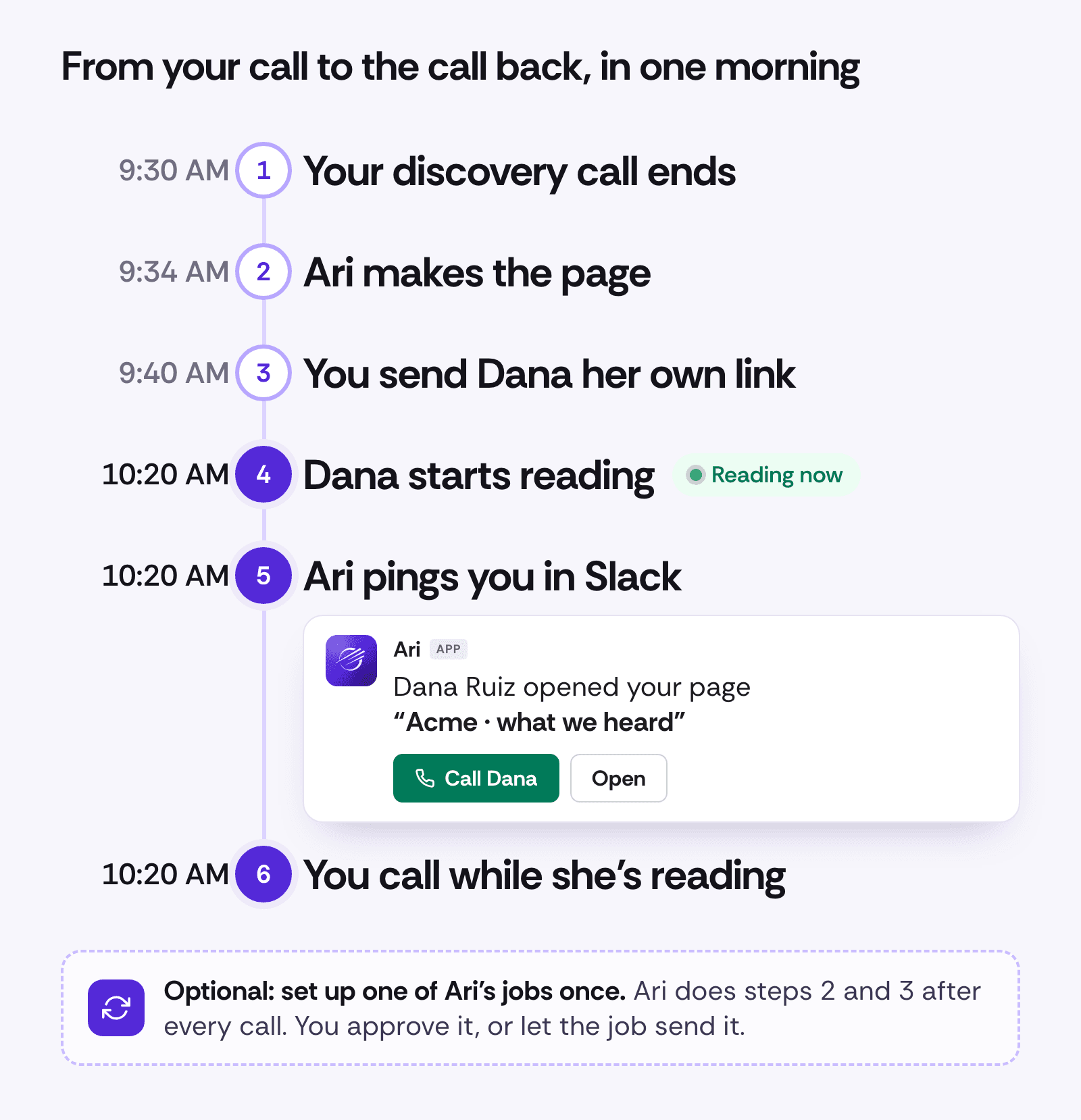
1. Have the call
Ari works from what was said: calls in the Salesfinity dialer, Gong calls if Gong is connected, your notes and files you attach. For a Zoom or Meet call that isn't in Gong, add a line of notes when you ask.
2. Ari makes the page
Open Pages & decks, click + New, and ask for a page (a web page that reads well on a phone) or a deck (slides). Ari builds it while you watch. The quickest start is the Call recap card:
Make a page for Dana Ruiz that recaps our call today and confirms our meeting on Thursday.
A deck builds slide by slide, flags one number To check, and downloads as PowerPoint or PDF.
On a page, click any text to change it; on a deck, ask Ari. Decks have 12 slide layouts, speaker notes and Present. Any number Ari typed itself is marked To check, for you only. Your card goes on everything you share, in your team's brand, with Book a time if your calendar link is on your profile.
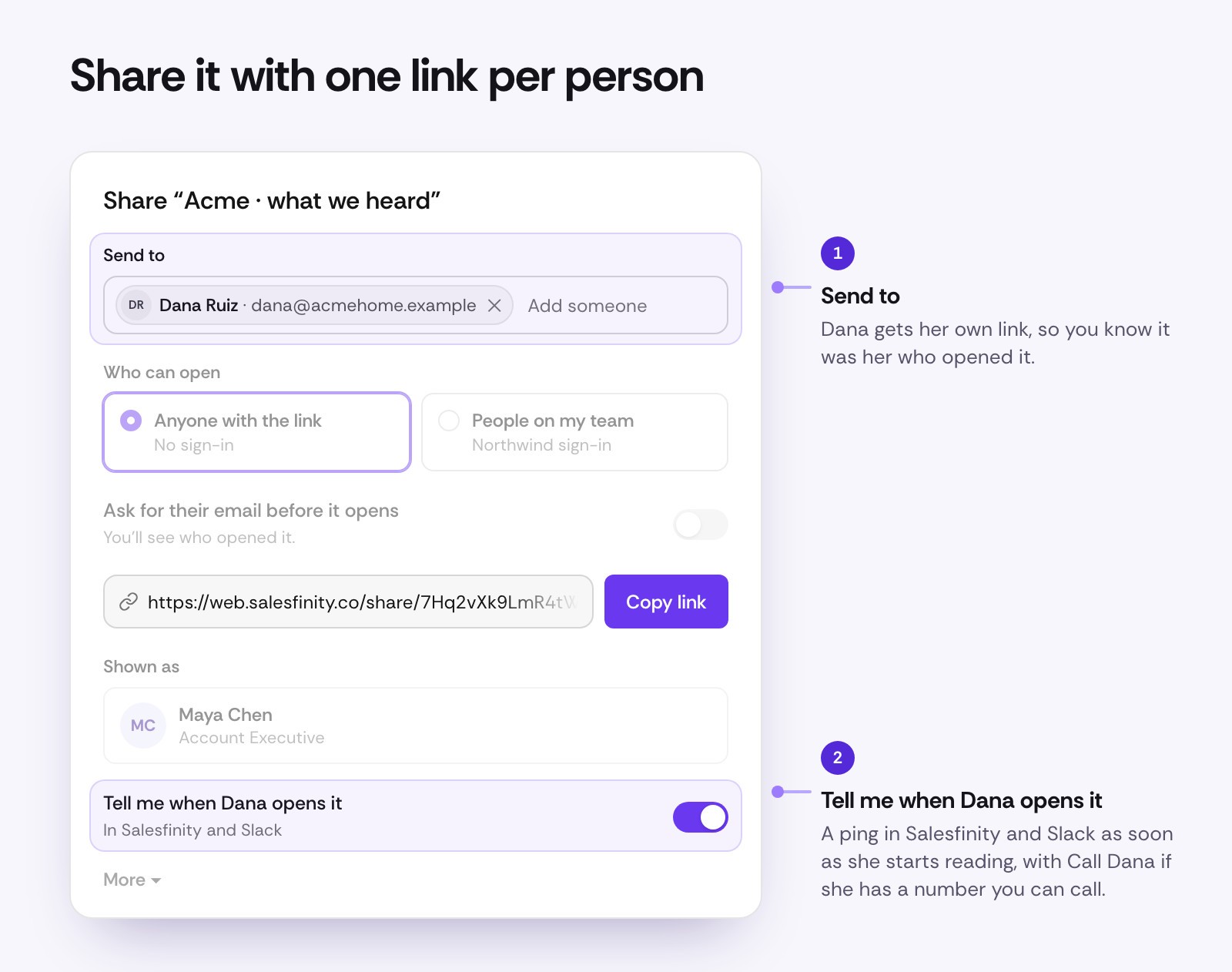
3. Send it to Dana
Click Share and add Dana under Send to. She gets her own link, with Tell me when Dana opens it already on. Send it from your own email, or ask Ari to draft one; Ari can send from your connected Gmail, and by default it asks you first. Docs and lists you share from Ari work the same way.
4. Dana starts reading
Dana opens her link, with no sign-in. Once she scrolls, clicks or taps, she counts as reading.
5. Ari pings you
As soon as she starts reading, Ari messages you in Slack: Dana Ruiz opened your page "Acme · what we heard", with Call Dana and Open. Later visits say so, like (3rd time). In Salesfinity, a notice pops up with Call and Open. You get at most one ping per person every 30 minutes.
Ari's messages for Dana's three visits. Call Dana opens the dialer with her loaded.
6. Call while she's reading
Call Dana opens the Salesfinity dialer on her while your page is still on her screen. In the app, Call dials after a 3-second countdown you can cancel. The button shows when Dana is in Salesfinity with a number you're allowed to call.
Then see what she cared about
The rest is in Pages & decks, under Outreach. While Dana reads, her row says Dana is reading now, and Ari's line on top has Call Dana: Dana Ruiz is reading your page "Acme · what we heard" right now: 3rd visit, mostly pricing.
Dana's row turns to reading now, her visits and time per section show, and Call Dana dials.
Open the page for Who opened it: each visit and how long it lasted. Where Dana spent time shades each section of a page, or slide of a deck, by how long she spent there.

So your next call skips "did you get a chance to look?" and starts with pricing.
Do it after every call with Ari's jobs
A job makes the page and the email after a meeting, then waits for Maya to approve.
To skip even the asking, set up an Ari job once. It runs each time a meeting with someone outside your company ends on your calendar, or you log a call:
When a discovery call ends, make a recap page for the prospect and draft the email with their link.
Ready-made jobs like Recap my meetings already draft the follow-up email; add "make a page for them" to get the page too. By default, Ari asks before a link or an email goes out; set the job to Skip all permissions and it sends on its own.
Seven follow-ups to try this week
Each comes with words to type to Ari.
A recap page after a discovery call
For AEs, minutes after the call. On Zoom? Add notes:
Make a page for Dana Ruiz that recaps our call today and confirms our demo on Thursday. Notes: 3 locations, techs double-booked, wants it live by March.
Why the open matters: call while she's reading. Back a third time, mostly on pricing? Build Thursday's demo around pricing.
A short page when a cold call ends with "send me some info"
For SDRs, when Leo says "just send me something":
Leo asked for info. Make him a short page from our call just now and draft the email with his link.
Why the open matters: Call Leo while it's on his screen, not two days later. No open? He was brushing you off, and it didn't cost you a dial.
A page that confirms the meeting
For whoever booked it, the same day:
Make a page for Dana that confirms Thursday's demo: the agenda, who's joining from our side, and what to have ready.
Why the open matters: not opened the day before? Call to reconfirm, before it turns into a no-show.
A business case your champion takes to the CFO
For AEs, when your champion needs her CFO's yes:
Make a business case deck for Dana to take to her CFO, from our call today. Use our numbers where you can.
Send Dana her own link, plus a link without a name for her to pass along (see the FAQ). Why the open matters: tom@acmehome.example opened your deck "Northwind for Acme Home Services" · typed it in means it reached the CFO.
A pricing page with a simple calculator
For AEs, once pricing comes up:
Make a page for Dana with our pricing for 3 locations and a simple calculator for hours saved a week.
Why the open matters: minutes on Pricing? She's weighing it, so call. Seconds on Pricing and minutes on the plan to go live? The question is timing. (You don't see what she types into the calculator.)
A "what we heard" page for a deal that went quiet
For AEs, two weeks into silence:
Dana's gone quiet. Make a short page with what we heard on our calls and one simple next step.
Why the open matters: an open after two weeks of silence is your reason to call today. No open? Try someone else at Acme.
A quarterly review deck for account managers
For account managers, with the usage sheet attached:
Make a QBR deck for Acme's review next week. Use this sheet and add a slide on next quarter's goals.
Why the open matters: send each attendee their own link, and walk in knowing who read it and which slides they cared about.
What this changes for your team
Call when interest is highest, while your page is on their screen.
Catch a no-show early: no open by the day before means call and reconfirm.
Open the next call with what they cared about.
See when it reaches the person who signs, with a link without a name that asks for their email.
Never skip a follow-up on a busy day, with an Ari job.
See the team's follow-ups. Team lists your team's latest 100 pages, decks and docs, who made each and how often it was opened; owners and admins can open any to see Who opened it.
What counts as a read
We'd rather show you fewer opens you can trust:
A reader counts after about 3 seconds on screen and a scroll, click or tap. Link previews, email scanners and bots never count.
Time counts only while the page is in front of them and they've scrolled, clicked, tapped or typed in the last minute.
Reading now means they read in the last 45 seconds.
Your teammates never count.
How to start
Open Pages & decks, under Outreach, and click + New.
Ask for a page or a deck, or pick Call recap.
Check anything marked To check, then click Share.
Add your prospect under Send to and send the link.
When the ping comes, click Call.
For pings in Slack, an owner or admin connects Ari to Slack once in Settings › Ari. Until then, pings show in Salesfinity.
Already on Gold, Enterprise or Enterprise Plus? Open Pages & decks and make your first page. Not using Salesfinity yet? Book a demo and we'll show you a follow-up that tells you when to call.
Frequently asked questions
Who gets Pages & decks?
Gold, Enterprise and Enterprise Plus licenses, as part of Ari.
Does it use credits?
Making a page or deck uses Ari credits. Opening, downloading, sharing and seeing who opened it don't.
Where do I see how long they read?
In Pages & decks, under Who opened it on the page or deck. The Slack message says who opened it and how many times.
Does my prospect need to sign in?
No. Links open without a sign-in. You can also make a link only your team can open.
What if they forward it?
A link you sent to Dana counts as Dana, even when forwarded. For a link she can pass along, turn on Ask for their email before it opens and copy a link without a name (under More). Whoever opens it types a work email first and shows up as that email, marked "typed it in". The email isn't checked.
Can I change it after I send it?
Yes. On a page, click any text; on a deck, ask Ari. Your changes show on the same link.
Can I download a deck as PowerPoint?
Yes. Click Download and pick PowerPoint (.pptx) to edit it in PowerPoint or Google Slides, or PDF. Readers can download a PDF only if you turn on Let them download a PDF under More when you share.
Read more

·
Author
How to Turn More Cold Calls Into Meetings (Without More Dials)
The short version: with today's dialers, volume is solved. Conversion is not. On the Salesfinity platform, 8.1% of cold call conversations turned into meetings in the 30 days to July 17, 2026, and most teams sit between 5% and 10%. Move it from 10% to 15% or 20% and you get 50% to 100% more pipeline from the calls you already make. The way there is relevance on every call: a talk track for each persona, coaching in the moment, and call scores that tell you whether to fix the process or the rep.
The Salesfinity platform, 30 days to July 17, 2026. Source: Cold Call Benchmarks.
Conversations aren't the problem anymore
With any of today's dialers, you can hit the volume. Parallel dialing and validated numbers put reps in front of more people than ever.
So getting people on the phone is no longer the hard part. The hard part is what happens after they pick up. Our own data shows it plainly. In the 30 days to July 17, 2026, connects on the Salesfinity platform rose 19.5% over the month before: 21,650 more people picked up the phone. Meetings rose by 7.
The bottleneck moved inside the conversation. So the question every sales leader should be asking now is simple: how do we turn more of these conversations into meetings?
What is a good cold call conversation-to-meeting rate?
A good conversation-to-meeting rate is about 10%: one meeting for every 10 real conversations. Most teams sit between 5% and 10%. Across the Salesfinity platform in the 30 days to July 17, 2026, it was 8.1% (Cold Call Benchmarks, July 2026).
Funnel stage
Volume
Conversion
Dials
1,315,034
Connects
132,682
10.1% of dials
Conversations
42,405
32.0% of connects
Meetings booked
3,445
8.1% of conversations
That last row is the one to watch. 38,960 real conversations, with people who picked up and talked, ended with nothing on the calendar. The month before, the rate was 8.6% (Cold Call Benchmarks, June 2026).
To find your own rate, divide the meetings booked by the conversations held in the same period. Count a conversation only when the rep actually talked with the person: not a voicemail, a wrong number or a gatekeeper. For the full benchmark set, including dials per meeting by percentile, see Cold Calling Benchmarks 2026: What 1.3M Dials Reveal.
The math: 15 to 20% conversion means 50 to 100% more pipeline
Now picture a team at 10% turning 15% or 20% of its conversations into meetings instead. Same list, same dials, same connect rate. Only the last step changes.
Conversations that become meetings
Meetings from 1,000 conversations
Meetings compared with 10%
10%
100
Baseline
15%
150
+50%
20%
200
+100%
Illustration. That is 50 to 100 more meetings for every 1,000 conversations, without buying another list, hiring another rep or making another dial.
There is plenty of room to grow. On the same dialer, in the same 30 days, the best team on the platform booked a meeting every 102 dials and the weakest needed 690. Volume is not what separates them. What happens inside the conversation is.
Why conversion is so hard to move
To convert more conversations, reps have to be relevant in the first minute. Getting there takes rigorous coaching, and selling into enterprises makes it harder in three ways.
Every persona cares about something different
When you sell into enterprises, you are never talking to just one buyer. Managers, directors and VPs each care about different things, and what lands with one falls flat with the next.
Who picks up
What they care about
What lands
Manager
Their team's week: workload, tools, this month's number
A problem their team hits every day, and how it goes away
Director
Moving the team's number, and proving it
A result from a team like theirs
VP
This year's priorities and the risks to them
Why it matters now, at the company level
Add industries on top, each with its own language and its own objections, and the talk track a rep needs changes from one call to the next.
New reps take months to get there
A new SDR has to learn the problem you solve, each persona, each industry and your product, plus the answers to the objections each one raises. Until they do, they struggle on exactly the calls that matter most. That takes months.
Managers don't have the hours
If your reps are coachable and your managers can spend real time on the floor, they will get there. But if you are growing fast, managers can't sit in on every call or coach every rep on every persona. Ramp slips even further, and every call a rep isn't ready for is a meeting you don't book.
How to turn more cold calls into meetings
Six things move this number. None of them need more dials.
1. Chase completions, not only meetings
Not every good cold call ends in a meeting. With the wrong person, the right outcome is a referral. With the right person at the wrong time, it is a follow-up. A rep who pushes for a meeting on every call kills the conversation before the pain comes out. Define a good outcome for each situation instead. We call these completions:
Meeting booked: the right person, with a real pain and some interest.
Qualified: the right person with a real pain, not ready to meet yet.
Referral: not the right person. Get the name of who is, and call them right away.
Follow-up set: the right person at the wrong time. If they say "call me in a month", call back in two weeks.
Info gathered: they won't engage now, but they'll tell you what they use and when it renews.
Disqualified: not a fit, or firmly not interested. Ask for the quick reason and end politely.
The meetings come from the calls where they are earned, and the rest of the calls still move the account forward.
2. Follow a call flow that earns the meeting
The cold calls that convert follow the same arc: get permission, earn a little trust, confirm you have the right person, make it relevant, then ask. This is the call flow Live Assist starts every team with, and you can change any step.
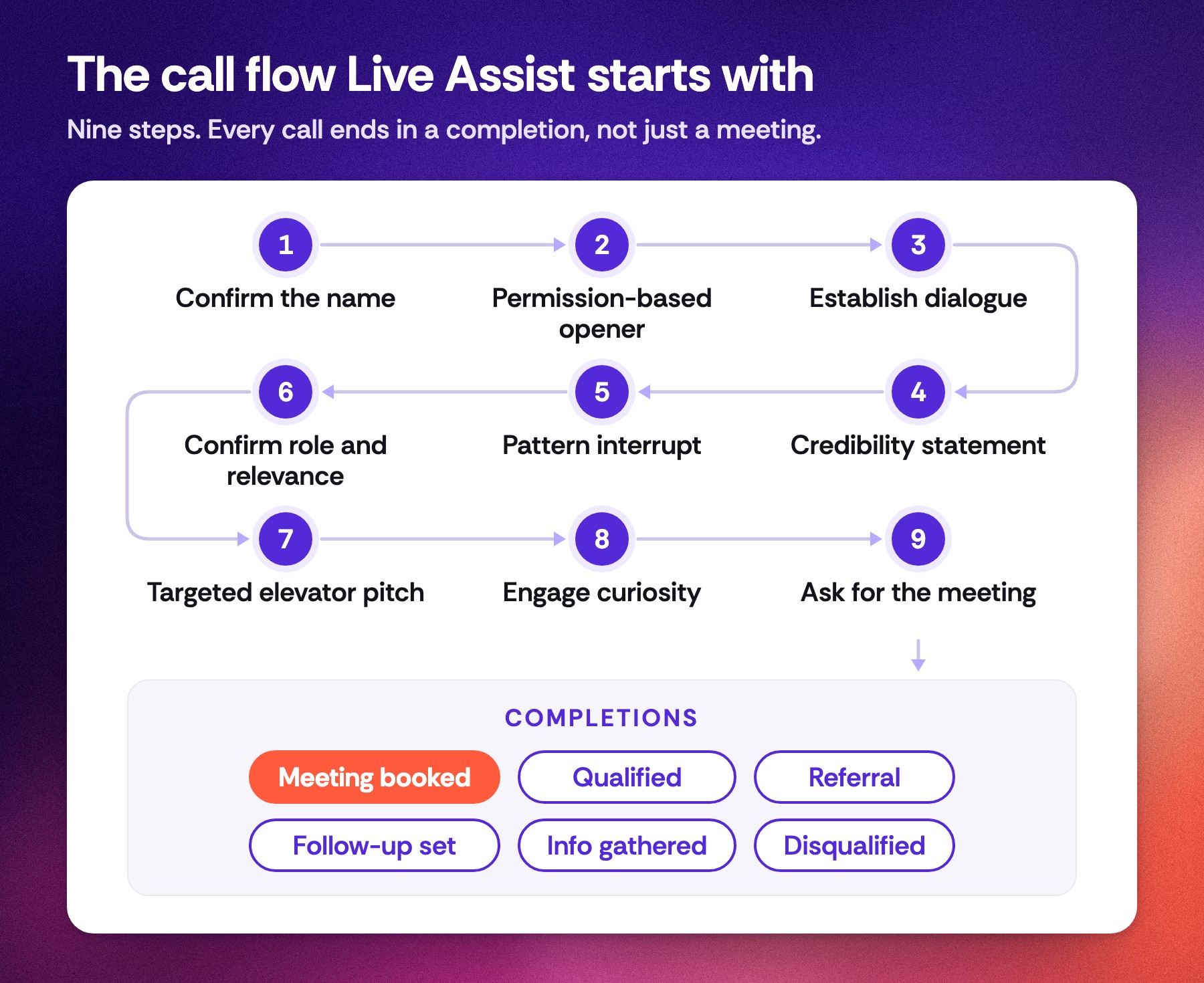
The ask comes last, only once the role, the relevance and a real pain are clear. Make it easy to say yes: "Would you be opposed to a quick 15-minute chat, say Tuesday at 10 or Wednesday at 2?"
3. Write a talk track for each persona
One generic pitch can't serve a manager, a director and a VP. For each persona, write down the problem they feel, the outcome they want, and one line that connects the two. Keep the pitch to one breath: problem to outcome.
4. Bring proof that fits the person on the line
"We work with teams like yours" only lands when the rep can name a customer the prospect recognizes, in their industry, with a result they care about. Keep your case studies and customer stories where reps can use them in the middle of a call, not in a folder nobody opens.
5. Prepare for the objections you hear most
Many calls are lost in the few seconds after "not interested", "we already have something" or "send me an email". Your best rep has an answer ready. Write those answers down as rebuttals and battle cards so every rep has them. There is more on this in Overcoming Objections in Cold Calling.
6. Score every call against the same scorecard
You can't improve what you can't see. Score every call against one scorecard, the one that describes your process, so you know who follows it and whether it works.
Live Assist: a coach on every call
All six of those work when a manager has the time to coach every rep on every persona. Most don't. We built Live Assist to close that gap.
Salesfinity gives your reps the conversations. Live Assist helps them win more of those conversations. You build your playbook once: how to talk to each persona and what matters to them. Then you add what your best reps already rely on:
Case studies and customer stories
Rebuttals for the objections you hear most
Battle cards
Talk tracks and your call flow
A real call on our own account. Our founder plays the prospect: "We are all set with our current dialer." This is what the rep's screen does next.
During the call, Live Assist listens to both sides. When the prospect pushes back, names a competitor, asks a question or shows a buying signal, the rep gets one short line to say, with a follow-up for what to ask next. When the rep starts answering, it steps back.
It coaches reps toward completions, even when no manager is on the sales floor. The coach works in the background on every call, so reps stop going quiet when they don't know what to say. The first time you see it, it feels like magic.
Another real call. The prospect is not the right person and has no budget. Live Assist gives the rep the line from the team's battle card, the prospect names the team that owns the problem, and the call ends as a Referral.
The lines come from your own material: your team's own plays first (when they say this, you say that), then battle cards, then your call framework. If nothing fits, it falls back to general guidance and labels it. It does not make up customers or numbers. For the full tour, see Introducing Live Assist.
Process problem or behavior problem? Now you can tell
Live Assist and call scoring do two things together.
1. Your process reaches every rep
When you set up a process you believe in, Live Assist makes it the default on every rep's calls, not only your best reps'. The call flow, your answers to objections and your must-do checklist show up live, and the checklist ticks itself off as the rep covers each item.
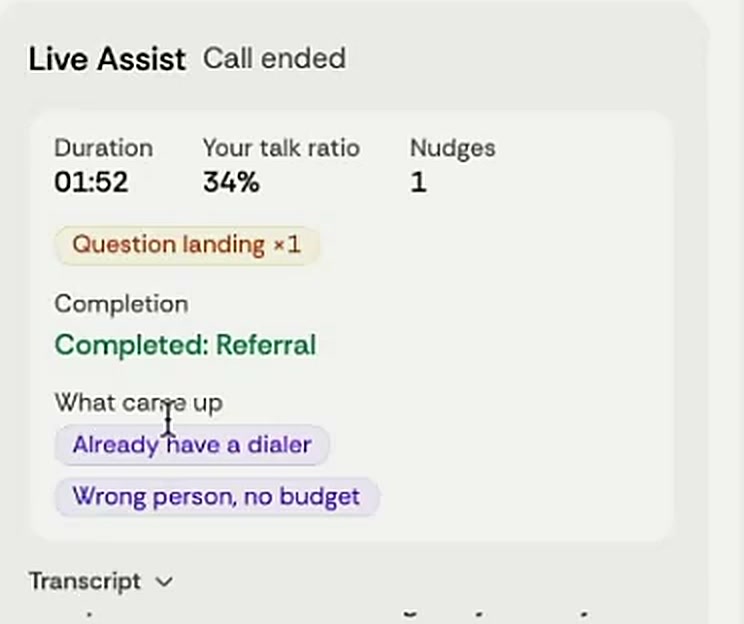
When the call ends, the rep sees a recap: the talk ratio, the nudges, the completion they reached and the must-dos they covered.
2. You see whether it works
After each call, Salesfinity scores it against your own scorecard. You decide what it grades and how much each part counts (Score calls your way). Then you see, rep by rep, who is following your process and whether it books meetings.
Put those scores next to meetings booked, and every rep lands in one of four places:
Following the process and booking meetings: the process works. You have a repeatable way to book meetings, so you can hire more reps and scale it.
Following the process and still not booking: it's a process problem, not a people problem. Change the playbook, then check the next month's scores.
Not following the process: it's a behavior problem. Coach the rep, or make the hard call.
Booking without the process: find out what they do differently, and add it to the playbook.
No more black box. Conversion stops being an art and becomes a science: instead of guessing why meetings are down, you know whether to fix the playbook or coach the rep.
Get started this week
Find your rate. Divide last month's meetings by last month's conversations. Under 10% means there is pipeline on the table.
Write the playbook. Pick your top three personas. For each, write the talk track, the proof and the answers to the top objections.
Put it on every call. Load the playbook into Live Assist so every rep has it, live.
Review the scores every week. Place each rep in one of the four boxes above, then scale, fix the process or coach.
Try Live Assist
Turn more of the conversations you already have into meetings, and know whether to fix the process or coach the rep.
Not using Salesfinity yet? Book a demo with our sales team and we'll show you Live Assist on a real call. Already a customer? Ask your CSM to turn it on for your team.
Frequently asked questions
What is a good cold call conversation-to-meeting rate?
About 10%, or one meeting for every 10 real conversations. Most teams land between 5% and 10%. Across 42,405 conversations on the Salesfinity platform in the 30 days to July 17, 2026, the rate was 8.1%.
How many cold calls does it take to book a meeting?
On the Salesfinity platform in the 30 days to July 17, 2026, it took 382 dials on average. The best team needed 102 dials per meeting and the weakest needed 690.
How much more pipeline does a higher conversion rate give me?
Meetings grow in step with the rate. Going from 10% to 15% of conversations means 50% more meetings from the same calls. Going to 20% doubles them.
Why don't more dials fix it?
Because the leak is inside the conversation, not before it. Month over month, connects on the platform rose 19.5% while meetings rose 0.2%.
How long does it take a new SDR to ramp?
Months. A new rep has to learn your problem, your personas, your industries and your product, plus the objections each one raises. Live Assist gives them your best answers on their first call while they learn.
What does Live Assist do?
Live Assist is a real-time sales coach inside the Salesfinity dialer. It listens to a live call and, when the prospect pushes back or shows interest, shows the rep one short line to say from your own playbook. When the call ends, the rep gets a recap, and call scoring grades the call against your scorecard.
How do I get Live Assist?
Live Assist is an add-on for Salesfinity customers: ask your CSM to turn it on. New to Salesfinity? Book a demo.
Sources: Cold Call Benchmarks, The Call Report, July 2026 and June 2026, Salesfinity platform data. Live Assist call flow and completions are the product defaults; every team can edit them.
Read more

·
Author
Introducing Live Assist: Real-Time Call Coaching From a Playbook That Updates Itself
The short version: Live Assist is a real-time sales coach inside the Salesfinity dialer. The moment a prospect pushes back, the edges of the rep's screen light up and one short line to say appears under the call bar, pulled from your own battle cards. Pair it with a scheduled Ari job that reviews yesterday's calls and updates those battle cards, and your best talk tracks reach every rep on the next dial, without another training session.
A real call on our own account. Our founder dials his own phone and plays the prospect: "We are all set with our current dialer." This is what the rep's screen does next.
Why we built Live Assist
If you manage SDRs, you already know where cold calls are won and lost. It is the few seconds after a prospect says "not interested", "we already have something" or "send me an email". Your best rep has an answer ready. Your newest rep freezes, and the call is over.
The usual fixes all arrive too late:
Call reviews happen the next day, after the meeting is already lost.
Training sessions fade by the next call block.
Battle cards hold the right answer, but nobody opens a doc in the middle of a live conversation.
You can only sit in on one call at a time.
Live Assist moves the coaching into the call itself. And because it reads your team's battle cards, it also gives you a new way to roll out what works: change the card, and the whole team has the new line on the very next call.
Your best talk tracks, rolled out on autopilot
This is the part SDR managers ask about first. Live Assist reads your battle cards at the start of every call. So whatever is in those cards is what your reps see when a prospect pushes back. That makes battle cards the fastest training channel you have, and Ari, your AI teammate in Salesfinity, can keep them current for you.
Your reps make their calls. Salesfinity records them and keeps the transcripts and outcomes.
A scheduled Ari job reviews the previous day's calls. It looks at which objections came up most, which answers kept the prospect talking, and which ones ended the call.
Ari updates your battle cards with what worked.
On the next call, Live Assist puts the updated line on every rep's screen, at the moment they need it.
Setting it up takes one message to Ari. For example:
Every day at 7am, review yesterday's connected cold calls. Find the objections that came up most and the answers that led to a meeting or a referral. Update our battle cards with what worked, and tell me what you changed.
You decide how much Ari can change on its own. Set the job's permission to Manual and Ari asks before every battle card edit. Set it to Auto approval and it updates the cards without asking. Either way, each run is listed under Ari's jobs, so you can open it and see exactly what it did.
The result is a loop that used to take a manager hours every week: listen to calls, spot what works, rewrite the playbook, retrain the team. Now the review runs every morning, and the rollout happens on the next dial. Scheduled jobs are available on plans that include Ari.
What your reps see on a live call
Live Assist listens to both sides of a connected, recorded call. When the prospect raises an objection, names a competitor, asks a question or shows a buying signal, the rep gets:
One short line to say, big enough to read at a glance, right under the call bar.
A follow-up, labeled Then, for the next thing to ask.
A glow around the edges of the screen, so the line is hard to miss. It is violet for a pushback and green for a buying signal.
The source of the line, such as the name of the battle card it came from, so reps and managers know why it was suggested.
Once the rep starts answering, Live Assist steps back. The glow stops, the line shows You're on it, and a few seconds later it tucks itself into the Live Assist card. Reps can also press Esc to dismiss a line.
The lines come from your own material, in this order: your team plays, then your battle cards, then your call framework. Only when none of those fit does Live Assist fall back to general guidance, and that line is labeled so nobody mistakes it for your playbook. It does not make up customers or numbers. A line that quotes a number that is not in your material or in the call is dropped before the rep ever sees it.
Every call steers toward an outcome you define
Not every good cold call ends in a booked meeting. Sometimes the right outcome is a referral to the person who owns the problem, or a follow-up at a better time. Live Assist calls these completions, and you decide which ones count for your team.
It starts with six: Meeting booked, Qualified, Referral, Follow-up set, Info gathered and Disqualified. Edit them or add your own, each with when it applies and how to get there. Live Assist then steers every suggestion toward the completion that fits the person on the line.
In the clip above, the prospect says he is not the right person and there is no budget. The line Live Assist gives the rep comes from the team's battle card for that objection: "Got it, you're not the right person. Who usually owns this on your side?" The prospect names the team that does, and the call is marked Completion · Referral.
Nudges while they talk, and a checklist that ticks itself
Alongside the suggested lines, Live Assist watches how the conversation is going and gives small tips when a rep needs one:
Slow down when the rep is talking too fast.
Let them talk when the rep's share of the conversation gets too high.
Let them finish when the rep keeps talking over the prospect.
Pause and ask a question after a long monologue.
Let the question land when the rep asks something and keeps going.
You set the threshold for each tip, and how often tips may appear. Your team's must-do checklist also ticks off live as the rep covers each item, with a reminder before they hang up if something is still open. The checklist can be the same one you already use for call scoring.
A recap the second the call ends
When the call ends, the Live Assist card turns into a short recap: how long the call ran, the rep's talk ratio, the nudges they got, the completion they reached, every objection that came up and how many must-dos they covered. The rep sees what happened while the call is still fresh, not in a review the next day.
Set it up once for the whole team
Owners and admins control Live Assist in Settings → Coaching → Live Assist. Click Change and you will find six sections:
On screen. Choose how a line reaches the rep: Glow and line, Line only, or Card only. Set how long the glow and the line stay.
Call framework. Your objective, your pitch (your company, the customers you can name and what you help with), your completions and your call flow. The default flow has nine steps, from confirming the name to asking for the meeting.
When to interrupt the rep. The tips above, each with its own threshold.
Suggest what to say. Turn help on or off for objections, competitors, questions and buying signals, and set how long a line can be.
Team plays. Your own rules: when the prospect says this, suggest saying that. These come before battle cards.
Must-do checklist. Use the same list as your call scoring or write a separate one.
Reps add the Live Assist card to their dialer with Add card, or an admin can add it for everyone in the Card Layout tab. The glow and the line work even without the card. Each rep can also switch Live Assist off for themselves in their dialer preferences.
What this changes for SDR managers
Coaching happens during the call, not in the review the day after.
A new rep gets your best answer on their first call, instead of having to learn it from old recordings.
There is one place to change the talk track. Edit a battle card or a team play, and it is on every rep's screen on the next call.
You define what a good call is. Completions and call flow are yours, and every suggestion steers toward them.
The playbook keeps up with the market. With a scheduled Ari job, your battle cards are updated from real calls, not from memory.
How to get Live Assist
Ask your CSM to turn on Live Assist for your team. It is included in every Enterprise license.
Open Settings → Coaching → Live Assist and choose how it shows up on screen.
Add your pitch, your completions and your call flow, or start from the default framework.
Have your reps add the Live Assist card to their dialer and make a call. Live Assist runs on recorded calls, once a person answers.
Already a customer? Ask your CSM for access. Not using Salesfinity yet? Book a demo and we will show you Live Assist on a real call.
Frequently asked questions
What is Live Assist?
Live Assist is a real-time sales coach in the Salesfinity dialer. It listens to a live call and, when the prospect pushes back or shows interest, shows the rep one short line to say. It also gives talk tips, tracks a must-do checklist, and writes a short recap when the call ends.
Where do the suggested lines come from?
From your own material first: team plays, then battle cards, then your call framework. If nothing fits, Live Assist gives general guidance and labels it as such. Every line shows its source.
Will it make up numbers or customer names?
No. Live Assist only uses numbers and customers that appear in your own material or in the call. A line that quotes anything else is dropped before the rep sees it.
How do my battle cards stay up to date?
You can edit them yourself at any time, or give Ari a scheduled job to review recent calls and update the cards with what worked. You choose whether Ari asks for approval before each change. Scheduled jobs are available on plans that include Ari.
Does it work on every call?
Live Assist runs on recorded calls in the Salesfinity dialer, and it starts when a person answers. Calls you do not record do not get Live Assist.
Can a rep turn it off?
Yes. Each rep can switch Live Assist off in their dialer preferences. Managers choose how it appears for the team: with the glow, as a line only, or only inside the card.
Does it replace call scoring?
No. Call scoring grades a call after it ends. Live Assist helps during the call. They work together: the must-do checklist in Live Assist can be the same list your scoring uses.
How do I get it?
Live Assist is included in every Enterprise license. Ask your CSM to turn it on for your team.
Read more

·
Author
GTM Engineering for the Phones: Four Workflows You Can Build This Month
By Ben Holley, Head of GTM at Apero Advisors
Most GTM engineering content is about email because most GTM engineers don't know anything about picking up the phone.
Having been an SDR at multiple companies and having made thousands and thousands of cold calls in my life, I can confidently tell you that the phone is where some of the highest-leverage GTM engineering activities will ever occur. A call is the one touch that gets an answer in real time, and almost nobody builds systems around it. Reps still get a list, a dialer, and a hope.
Here are four workflows any team can stand up with a CRM, a dialer, and a handful of automations. Each one is written so you can build it in your own stack. Where it helps, I’ll show how it looks with Salesfinity — their REST API and Dial Links make the plumbing a lot less annoying than it used to be.
Workflow 1: Route every inbound lead to a rep’s phone in minutes
Anyone who raises their hand should be on a rep’s phone within minutes. And you should be able to prove it.
The build is five steps:
Someone submits a form or downloads an asset. The CRM creates or updates the contact.
A CRM workflow assigns an owner: round robin, territory, or the existing account owner.
That same workflow dumps the lead into the rep’s call queue and fires a Slack alert with a button.
Rep clicks the button. Dialer opens on that person. Rep makes the call.
CRM logs the call. A report measures the gap between submit and first dial.
Same pattern works for positive replies to cold email. Someone replies → email tool hits a webhook → CRM → same routing. Keep the routing logic in the CRM, not in the email tool, so every source of interest follows one set of rules. Otherwise you’ll have three “speed-to-lead” systems that all disagree with each other.
How this looks with Salesfinity
Two good ways to build step 3:
Dial Link. A Dial Link is just a URL that carries a person’s phone number and details. Click it, dialer opens on that person. Build it from CRM fields (phone, name, company, email) and put it behind the Slack button. Add
auto_dial=1if you want the call to start after a three-second countdown the rep can cancel. Include the email so Salesfinity can match them to the existing contact and pull call history. Their docs have ready-made link templates for HubSpot and Salesforce.API enrollment. Salesfinity’s REST API can add a contact to a sequence and set the owning rep in the same request, so the call task lands in that rep’s queue. Contact doesn’t exist yet? The request creates it.
The speed-to-lead report
Build one report: average minutes from form submission to first call, by rep. Subtract submission timestamp from the first logged call on the contact, average by owner. Salesfinity logs each call back to the contact in HubSpot and Salesforce, so the call timestamp is already sitting in the CRM. Everyone sets this up a little differently — in most CRMs it’s one calculated property and one dashboard tile. Put it where the whole team can see it. Everybody should know where they stand.
Workflow 2: Let signals decide who gets called today
A signal tells you who to call this week, so the rest of the list can wait. Pick the two or three events that actually precede a purchase of what you sell. Common ones: funding round, a hire for a role tied to your problem, a champion changing jobs.
The build:
A signal source (data provider, Clay table, job-board scraper, whatever) detects the event.
A webhook writes it to the CRM as two fields: signal text + signal date.
A CRM workflow creates a call task for the owning rep, with the signal in the task description.
Signals expire. After N days the task drops out of the queue, because a funding round from three months ago is not a reason to call anymore.
The point of step 3: the reason to call travels with the lead. Rep opens the task and sees why this person is here today. Not “here’s another name from the scrape.”
How this looks with Salesfinity
The API can create a one-off call task for a contact — or up to 500 at once — with due date, priority, assignee, subject, and note in the request. Put the signal in the subject or note and the rep sees it when the task comes up.
Salesfinity’s assistant, Ari, can also build signal-based account lists (e.g. companies hiring for a given role) and watch a list for job changes on a weekly routine, so you can start without wiring the whole signal source yourself. Nice if you don’t want to invent Clay Day One.
Workflow 3: Put a few lines of research in front of the rep
Give every call a short, researched context field that shows up while the phone rings.
First, a rule: build your call lists from people who share the same problem, so one pitch works for the whole list. The context field is not there so you can rewrite your opening every time. That’s how you get reps reading a novel while the line’s connecting.
It’s there for what happens after the first 30 seconds. Once the conversation is live, a funding round, a hiring push, or a new product launch helps the rep steer toward the problem that actually matters to this account. That’s what turns more conversations into meetings.
What belongs in the field depends on your business. Examples to react to, not a template:
Sell to manufacturers → show their open roles.
Sell to fintech → show the verticals they’re certified to work in.
Sell to funded startups → show the round size and date.
Keep it to two or three short lines. A rep will not read a paragraph while a call connects. If they say they will, they’re lying.
The build:
Define the two or three facts that change how your best reps run a call.
Enrich each account for those facts (data tool or a small research agent) and write the result into a single CRM field.
Sync that field to the dialer so it displays on the call.
How this looks with Salesfinity
Contacts added through the API can carry up to 100 custom fields each, which also work as merge fields in sequence templates. The API can attach a note to a person. Dial Links accept a
notesparameter of up to 2,000 characters shown with the contact. Any of these can carry your two or three lines. Don’t use all 2,000. Please.Workflow 4: Turn call outcomes into data that fixes the list
Every dial should make your next list better. Most teams lose that value because call outcomes sit in free-text notes — or never reach the CRM in a form a workflow can actually use.
Salesfinity already lets reps pick a disposition when they log a call, and that maps back to HubSpot / Salesforce. Good. Still: a lot of teams want the categorization done from the recording itself, not from a tired rep clicking the least-wrong dropdown after their fifth parallel session.
The build I'd actually propose:
Standardize the dispositions you care about so each outcome means one thing: connected, voicemail, wrong number, bad data, call back, not interested, meeting set — whatever your motion needs.
When a call completes, grab the recording (and transcript if you have it). Salesfinity's call log exposes a
recording_url; you can also hook aCALL_LOGGEDwebhook so you don't have to poll.Run an agent that listens to / reads the call and picks a disposition from your fixed list — deterministic enough that "wrong number" and "not interested" don't get confused.
Write that disposition back onto the CRM call object (HubSpot call engagement outcome / Salesforce task or call), plus any contact flags your workflows need (bad data → re-enrich, call back → follow-up task, not interested → suppress for N days).
One honesty note from the docs: Salesfinity's public REST API is read-only on call logs and dispositions. You list dispositions, you read call history, you get webhooks — you don't PATCH a Salesfinity call to change the outcome after the fact. So the writable "call object" for automation is the one in your CRM, which is also where your speed-to-lead and list-hygiene workflows should live anyway.
Once a week, review connect rate and meetings booked by list and by rep. Retire the lists that dial well but never convert. Without disposition data you can trust, you cannot tell a bad list from a bad pitch from a bad rep. You'll just have opinions in standup.
How this looks with Salesfinity
Native path: rep logs a disposition in the dialer → Salesfinity creates a HubSpot call engagement (or Salesforce completed task) with the mapped outcome, notes, and recording link. Your CRM workflows fire from there.
Agentic path: subscribe to
CALL_LOGGED(or poll call logs), pullrecording_url, categorize with your agent, then update the HubSpot/Salesforce call engagement disposition and any contact fields. Use Salesfinity's disposition list as the vocabulary so your agent's labels stay aligned with what reps see in the dialer. Enrichment endpoints can still look up a fresh phone or email from LinkedIn when the agent flags bad data — without waiting for someone to "get to it."What to build first
Build in this order:
Inbound routing (Workflow 1). Fastest to ship, and the speed-to-lead report gives you a baseline on day one.
Disposition workflows (Workflow 4). Clean outcomes make every later report trustworthy. Skip this and you’re decorating fiction.
Call context (Workflow 3). Needs enrichment you can only tune once real calls are running.
Signals (Workflow 2). Needs a signal source and some tuning, so it comes last.
Test each workflow on a single record before you roll it out to the team. Most of the failures are small and stupid: a phone number that loses its country code, a routing rule that skips a territory, a field that never syncs. Fix those before you declare victory.
Want help building this?
Salesfinity gives you the dialer, the API, and the CRM sync. The workflows above are the glue between them.
If you want a hand building that glue, Apero Advisors implements Salesfinity with these workflows already in place. You don’t have to hire us. But if you do, we already know where the weird edge cases live.
Read more
·
Author
Introducing AI Coaching: Practice the Calls Your Team Keeps Losing
The short version: AI Coaching is live in Salesfinity. Every rep gets a short plan for today on their biggest gap to the top of their team: hear how a teammate handled it on a real call, practice it on a short call with an AI prospect, then use it on the next real call. Managers see where the team is losing calls and hand out the practice that fixes it in a few clicks. It replaces AI Training, on Gold, Enterprise and Enterprise+.
Alex's plan for today: hear how Maya got past "Just send me an email", practice it for 3 minutes, then use it on the next calls. All names and numbers are made up.
Same objection, same lost call
Every rep knows the moment. The prospect says "just send me an email", you say "sure", and the call is over. It happens again on Tuesday, and on Thursday. Somewhere on your team, someone gets past that line and books the meeting, but nobody has time to listen to every call and tell you what they say.
AI Coaching does that listening for you. It works from your scored calls (by default, calls over a minute that a person answered). As they add up, it learns your biggest gap, who on your team does it best, and which real moment to play you, and turns that into a few minutes of practice before your next call.
For reps: a plan for today
Open Coaching in your sidebar and you land on My coaching. The first time you open it each day, it builds Your plan for today, usually three steps:
Hear it. A short clip of a teammate doing it on a real call, cut around the moment that worked.
Practice it. A short practice call picked for that skill or objection, usually a few minutes.
Use it. Ari listens for it on your next real calls and tells you how it went, right on the card: You got past it on 2 of 3 calls today. Nothing to click.
The focus is the skill with the biggest gap between you and the top of your team on real calls over the last 30 days. When that's handling objections, it narrows to the objection that ended most of your calls this week. Until you have 10 scored calls of your own, the plan starts from the objection ending most of your team's calls, and it says so. If a training plan is due within 3 days, its next practice call comes first.
See where you stand
Once you have 10 scored calls, Where you stand on real calls puts every skill on one line: you, the team average and the top rep on your team, biggest gap first. Pick a skill to see What Maya does that you don't in plain numbers, like how often she gets past the objection or asks a question right after hearing it, with her clip one click away.
Handling objections is Alex's biggest gap: 62 next to a team average of 70 and Maya's 84.
Above it, Your week, next to your team shows conversations, meetings booked, the share of conversations that became meetings, and the days you practiced, each next to your team's average and its best number. Practice two working days in a row and a streak shows up in the header.
Practice calls that sound like your prospects
A practice call is a live voice conversation with an AI prospect. You get a brief first (who they are, your goal and what you're scored on) and the screen says it plainly: Practice only. No real call is made. Prospects come in four levels: Easy, Normal, Hard and Very hard. On Hard they push back twice and hang up if you pitch for about 30 seconds without asking anything.
The Practice tab has three kinds:
Your team's, built by your manager.
Salesfinity built-ins, like The first 10 seconds, Get past the front desk, "Just send me an email", Leave a 30-second voicemail and The first 3 seconds after a connect for parallel dialing.
From your team's calls: prospects rebuilt from real calls, with the tone, objections and pain points they actually had.
You can also practice the call you just lost. Open it in Call history and click Practice this call, or use the card the Dialer shows after a call of 30 seconds or more that you log as Not interested or Do not call again. Ari plays that prospect with what they actually said. During a dialing session, the card saves the call so you can practice it when the session ends.
And before you start dialing, the Dialer can offer a warm-up of up to 3 minutes, picked from how your calls went wrong the day before or from today's plan. It shows at most once a day, and you can skip it.
Feedback, usually in under a minute
Hang up and you go straight to your feedback. No star ratings, no forms. It usually lands in under a minute:
A score against the score to pass, 75 unless your manager set another.
How each part went on the skills that practice call is about.
Moments to look at: up to three moments from your own call, each with what they said and what you said. The ones to fix come with Try saying and a better line.
Redo from here restarts the call at that moment. The prospect picks up from their line, and only what you say from there is scored.
Alex's first try scores 68. One fix, Redo from here, and the second try passes at 81.
Practice is private. Your manager sees how often you practiced and your best score on each training-plan step, and hears an attempt only when you submit it.
For managers: coach the whole team in minutes
See where the team is losing calls
Owners and admins land on Team. It shows who practiced this week, the team score on real calls, and Skills on real calls: every rep against every skill once they have 10 scored calls, colored by score, with practice this week and the trend. Click a score to open that rep's calls, lowest on that skill first.
When a pattern shows up, Ari suggests flags it above, like Four reps keep losing calls at "Just send me an email", a rep who stopped practicing while a skill slipped, or a call worth sharing with the team. Each card has the button to act on it, and nothing reaches your reps until you click it.
Taylor turns Ari's suggestion into a practice call and assigns it to the four reps who lost those calls.
Turn one sentence into a practice call
Click New practice call and describe the prospect and what the rep should get out of the call:
A busy VP of Operations at a 300-person logistics company. Uses the email line to get off every call. The rep should book a 15-minute call.
In up to 10 seconds Ari drafts the whole thing: the prospect, the situation, the goal and the objections your team actually hears, each with a count like heard on 14 calls. You can also start from a real call or from a contact in your lists. Change anything, try the call yourself, then Save to Practice.
When an objection comes up on 10 or more of your team's calls in a week and no practice call covers it, the Practice tab flags it, with one button to draft them all for you to review.
Training plans and certificates
A training plan is a short list of steps: clips to listen to, practice calls each with a score to pass, and a due date. Pick the reps, and they get it in Salesfinity, plus a reminder two days before it's due. Six ready-made plans are there to start from:
First two weeks for new SDRs
Handle the 4 objections we hear most
Get certified on cold calls
Practice a new pitch
Warm up before you dial
Friday team challenge
Add a certificate and practice gets reps ready, while real calls earn it: a rep is certified when they pass the practice calls and then average your bar across their next real calls (10 by default). If you like, a certificate can unlock parallel dialing, up to 5 lines, never above what each rep's license allows. Nobody loses lines unless you turn on the lock and confirm it, with each rep who'd lose lines named.
You can also keep a plan assigning itself: for example, to anyone whose objection handling stays under 65 for two weeks. It's off until you turn it on, works on your own or customized plans, and only picks reps with 10 or more scored calls.
Learn from your best calls
Best calls is where the calls worth hearing live. Managers cut the moment that worked from any scored call with a recording, add a note, and put it in a playlist. Clips from calls of 30 seconds or more have Practice with this prospect. Each week Ari suggests new clips from the team's best calls, and a playlist can update itself every night, for example with the calls from the last 30 days that scored 85 or more and booked a meeting.
The Leaderboard ranks reps on one skill at a time, on real calls only, so practice never moves anyone up. Learn from the best at this shows the top 3 with a line on what they do, their best call, and Ask to listen in: if they say yes, you listen in, muted, for 15 minutes the next time they dial on the Salesfloor.
The leaderboard on handling objections, then a Best calls clip with Practice with this prospect under it.
What counts
AI Coaching is only as good as the numbers behind it, so we kept the rules strict:
Real calls only. Skill numbers and ranks come from scored real calls. Practice never counts toward them.
Scored calls. By default Salesfinity scores calls longer than a minute that a person answered. You can change that in your call scoring settings.
Enough calls first. Your own numbers show after 10 scored calls, and a rep is ranked after 20 scored calls in the period.
Your scorecard. Real and practice calls are scored on your team's own scorecard and skill names.
Private practice. Reps retry as often as they like. Managers see how often reps practice and their best training-plan scores, and hear only the attempts reps submit.
How to start
Reps:
Open Coaching in the sidebar.
Follow Your plan for today: hear it, practice it, use it.
Try a built-in practice call on the Practice tab, or practice your last lost call from Call history.
Managers:
Open Coaching and check Team.
Act on an Ari suggests card, or click Assign practice and pick a training plan.
Start a Best calls playlist with the calls you want every rep to hear.
Already on Gold, Enterprise or Enterprise+? Open AI Coaching and take your first practice call. Not using Salesfinity yet? Book a demo and we'll show you AI Coaching.
Frequently asked questions
Who gets AI Coaching?
Gold, Enterprise and Enterprise+ licenses. Owners and admins also get the Team view and build practice calls, training plans and playlists.
What happened to AI Training?
AI Coaching replaces it. In the app it's Coaching in your sidebar. Your team's existing practice calls are on the Practice tab under Your team's.
Do we need Slack?
No. Every coaching message arrives in Salesfinity. If your team connected Ari to Slack and Slack finds the person by email, they also get a Slack message; otherwise an email, between 8 am and 6 pm their time. Sharing a clip to a Slack channel needs Ari in your Slack.
Can my manager hear my practice calls?
Only the attempts you submit for a training plan. Your manager does see how often you practiced and your best score on each training-plan step, but not the calls themselves.
What languages do practice calls support?
English only.
Why do my skills still say Intro or CTA?
Teams that saved their scoring settings before this release keep the skill names they saved. An owner or admin can rename them in your call scoring settings.
Where do we turn off the warm-up or hide the leaderboard?
On the Scoring tab in Coaching. Owners and admins can switch off Suggest a warm-up before dialing and Show the leaderboard to reps, and set the score to pass.
What does the first week look like?
Practice calls, Best calls and training plans work right away. Skill numbers show once a rep has 10 scored calls, and the leaderboard starts when 3 reps have 20 scored calls in the period. Check that automatic call scoring is on first.
Read more
·
Author
Introducing Ari's Jobs: Hand Off the Work, Ari Owns It
The short version: Ari's jobs is live. Ari, the AI employee in Salesfinity, now takes jobs: say what you want done in your own words, like "every Monday, update our battle cards", and Ari does the work end to end, on a schedule or when something happens. It reports back in Slack or in the app, and by default it asks before anything reaches a prospect or changes your CRM.
Maya's jobs, all running. She types a new one, tries it once and starts it. All names are made up.
The work that never makes the calendar
Every sales team has a list of things that would win more deals if someone did them every week. Update the battle cards. Go through last week's calls and coach. Map the buying committee at the accounts that matter. Look at the deals you lost last quarter. Notice when a past champion lands somewhere new.
Nobody skips them on purpose. They just lose to the next call, every time. Ari's jobs gives that list to someone who never gets busy: you hand Ari the job once, and it does the work every time it comes up, without being reminded.
How a job works
A job is one sentence of what you want done, plus when Ari should do it. Here's the one Maya set up in the clip above.
1. Say it
Open Ari's jobs in the sidebar and type what you want, the way you'd ask a teammate:
Every Monday, check what changed at Contoso and update our battle card.
Click Draft the job. You can also ask Ari in chat, or in Slack, and it drafts the same job for you.
2. Pick when
Ari picks the kind of job from your words, and asks when it can't tell:
On a schedule: every 15 or 30 minutes, hourly, daily, weekly or monthly, at the time you choose.
When something happens: a call is logged, a meeting is coming up or just ended, a deal moves stage or closes, a prospect replies to your Salesfinity sequence, or another app sends a webhook.
For most jobs that wait for something, Ari looks back up to 90 days and tells you how many times it would have fired, so you know it's set up right before it ever runs.
3. Try it once
Click Try it once and Ari does the job for real, right there, so you see what it does before you rely on it. If it's not right, click Change something to edit the job, or Try again.
4. Approve and start
Click Approve and start. From now on, Ari does the job on its own and tells you how it went in Slack or in the app, whichever you pick under Tell me in.
5. Answer what needs you
When Ari needs a yes, like an email to a prospect or a CRM change, it lands in Needs you. Answer there, in chat or in Slack, and it clears everywhere. Every job keeps a history of What Ari did, and if a job that waits for something stays quiet, ask Why didn't it fire?
What Ari does on its own, and what it asks first
You decide how much Ari does alone, job by job:
Auto approval (the default): Ari researches, drafts, builds battle cards and practice calls, and adds notes on its own. Anything it would send, and any CRM change, waits for your OK unless your admin changed that in Settings › Ari.
Manual: Ari asks before every send or change.
Skip all permissions: Ari doesn't ask. Lookups that cost credits and deletes still do.
Owners and admins set the rules for the whole team in Settings › Ari, and what the team blocks stays blocked in every job.
Jobs to hand Ari this week
Copy any of these into Ari's jobs and change the names to yours.
Build battle cards, then keep them current
For everyone who sells against someone. Start with the card:
Build a battle card for Contoso: how they price, where they win, where we win, and what to say when a prospect brings them up.
Then give Ari the job of keeping it fresh:
Every Monday, check what changed at our competitors and update our battle cards.
Ari adds Contoso's new Starter plan and an answer to their new dispatch app. Reps see the same card in the dialer.
What you get: cards on the Battlecards page that reps also see in the dialer, mid-call, updated every week without anyone owning a spreadsheet.
Coach the team on last week's calls
For sales managers, every Monday:
Every Monday, go through last week's scored calls, find each rep's weak spots and send me a summary. Set up a practice call for the biggest one.
Ari's Monday message to Jordan: 42 calls scored, one line per rep, and a practice call ready for Sam.
What you get: per-rep scores, what's holding each rep back and the objections that came up, before standup. Ari sets up a practice call built around the biggest gap, ready for your rep. Ari coaches from the calls you can see in Salesfinity.
Map your target accounts
For AEs and SDRs working a named list:
Every week, map who's who at my top 20 accounts: draw the org chart and tell me who's missing.
An org chart for Acme Home Services with a Head of Finance still missing, then a HubSpot update from today's call, approved.
What you get: an org chart for each account, built from your CRM, your call history and the web, and who's still missing. Name the accounts, or point Ari at them in your CRM. Open the job's run in the app to see the charts.
Keep HubSpot or Salesforce up to date after every call
For anyone who hates CRM admin:
After I log a call, update the deal in HubSpot: stage, next step and anything new we learned.
What you get: the update drafted from your call, waiting in Needs you for one click. By default, Ari asks before it changes your CRM.
Win back lost deals
For AEs, once a month:
Every month, go through deals we lost 3 or more months ago, check what changed at each account and draft a comeback email.
Harbor Plumbing hired a new VP of Operations since they went with Contoso. Ari drafts the email and Maya approves it.
What you get: a short list of lost deals worth another try, the reason for each (a new leader, a new location, hiring), and a drafted email you approve before it goes out. On the AI Sequencer? Ask Ari to add them to a sequence instead; that asks first too.
Check on your past champions
For AEs and account managers:
Every month, check where my past champions work now and tell me who moved.
What you get: the people who liked you at their old company, at their new one, so you call them first. Name them, or tell Ari how to find them in your CRM. Checking where people work uses lookup credits, so by default Ari asks before each run.
Three more that reps set up on day one
Brief me before meetings: "An hour before each meeting with someone outside, send me a brief on the account and the people." Needs Google Calendar connected.
Follow up after calls: "After I log a call, draft the follow-up email and the next task."
Plan my day: "Every weekday at 8, tell me which accounts and follow-ups to work first."
You'll find these and more under Jobs other reps give Ari. Pick one and Ari drafts it for you.
What this changes for your team
The weekly work gets done every week, not when someone finds an hour.
Reps spend their time on calls, not on prep, CRM updates and research.
Managers start Monday with coaching ready, not with a stack of recordings.
Lost deals and past champions get a second look every month, instead of sitting in the CRM.
You stay in charge of what reaches a prospect. By default, Ari asks first.
How to start
Open Ari's jobs in the sidebar.
Say what you want done, or pick one of the jobs other reps give Ari.
Click Try it once and check what Ari did.
Click Approve and start.
For reports in Slack, an owner or admin connects Ari to Slack once in Settings › Ari. Until then, Ari reports in the app.
Already on Gold, Enterprise or Enterprise Plus? Open Ari's jobs and hand Ari its first job. Not using Salesfinity yet? Book a demo and we'll show you the jobs Ari can take off your team's plate.
Frequently asked questions
Who gets Ari's jobs?
Everyone with a Gold, Enterprise or Enterprise Plus license, as part of Ari.
Will Ari email my prospects on its own?
Not by default. On Auto approval, emails and CRM changes wait for your OK unless an admin lets them run on their own in Settings › Ari. On Manual, everything waits. Skip all permissions sends without asking, and admins can turn that option off.
Which tools can start a job?
Your Salesfinity calls and sequences, Gmail, Google Calendar, HubSpot and Salesforce, Slack channels Ari watches, and any other app through a webhook.
How often can a job run?
A scheduled job can run as often as every 15 minutes. A job that waits for something runs each time it happens, with a daily limit per job, so one busy job can't use up your month.
How many jobs can I have?
Up to 10 running at once per person.
Does it use credits?
Each run counts as one Ari message from your monthly allowance. Lookups that cost credits ask first, unless your admin sets a daily limit for them.
Where did Routines and Activity go?
They're all in Ari's jobs now. The routines you had are there as jobs, and old links take you to the right place.
Read more
·
Author
Introducing Pages & Decks: Follow-Ups That Tell You When to Call
The short version: Pages & decks is live: right after the call, ask Ari, your AI teammate in Salesfinity, for a follow-up page or deck, or set up a job once and it's made after every call. Send each person their own link, and as soon as they start reading, Ari messages you in Slack, with a button to call them if they're in Salesfinity with a number. Pages & decks then shows how long they read and where, so your next call starts with what they cared about.
Maya asks Ari for a recap page, sends it to Dana, and calls her from Ari's Slack message. All names are made up.
No more "did you get a chance to look?"
You finish a good discovery call, send the recap, and it disappears. Did Dana read it, forward it to her CFO, or never open it? You can't tell, so days later you call cold and ask the question every rep hates.
Pages & decks tells you who's reading and when. And because Ari lives where you make your calls, the ping comes with a button to call while your page is on their screen.
How it works
Here's one morning with Dana, from the discovery call to the call back.
1. Have the call
Ari works from what was said: calls in the Salesfinity dialer, Gong calls if Gong is connected, your notes and files you attach. For a Zoom or Meet call that isn't in Gong, add a line of notes when you ask.
2. Ari makes the page
Open Pages & decks, click + New, and ask for a page (a web page that reads well on a phone) or a deck (slides). Ari builds it while you watch. The quickest start is the Call recap card:
Make a page for Dana Ruiz that recaps our call today and confirms our meeting on Thursday.
A deck builds slide by slide, flags one number To check, and downloads as PowerPoint or PDF.
On a page, click any text to change it; on a deck, ask Ari. Decks have 12 slide layouts, speaker notes and Present. Any number Ari typed itself is marked To check, for you only. Your card goes on everything you share, in your team's brand, with Book a time if your calendar link is on your profile.
3. Send it to Dana
Click Share and add Dana under Send to. She gets her own link, with Tell me when Dana opens it already on. Send it from your own email, or ask Ari to draft one; Ari can send from your connected Gmail, and by default it asks you first. Docs and lists you share from Ari work the same way.
4. Dana starts reading
Dana opens her link, with no sign-in. Once she scrolls, clicks or taps, she counts as reading.
5. Ari pings you
As soon as she starts reading, Ari messages you in Slack: Dana Ruiz opened your page "Acme · what we heard", with Call Dana and Open. Later visits say so, like (3rd time). In Salesfinity, a notice pops up with Call and Open. You get at most one ping per person every 30 minutes.
Ari's messages for Dana's three visits. Call Dana opens the dialer with her loaded.
6. Call while she's reading
Call Dana opens the Salesfinity dialer on her while your page is still on her screen. In the app, Call dials after a 3-second countdown you can cancel. The button shows when Dana is in Salesfinity with a number you're allowed to call.
Then see what she cared about
The rest is in Pages & decks, under Outreach. While Dana reads, her row says Dana is reading now, and Ari's line on top has Call Dana: Dana Ruiz is reading your page "Acme · what we heard" right now: 3rd visit, mostly pricing.
Dana's row turns to reading now, her visits and time per section show, and Call Dana dials.
Open the page for Who opened it: each visit and how long it lasted. Where Dana spent time shades each section of a page, or slide of a deck, by how long she spent there.
So your next call skips "did you get a chance to look?" and starts with pricing.
Do it after every call with Ari's jobs
A job makes the page and the email after a meeting, then waits for Maya to approve.
To skip even the asking, set up an Ari job once. It runs each time a meeting with someone outside your company ends on your calendar, or you log a call:
When a discovery call ends, make a recap page for the prospect and draft the email with their link.
Ready-made jobs like Recap my meetings already draft the follow-up email; add "make a page for them" to get the page too. By default, Ari asks before a link or an email goes out; set the job to Skip all permissions and it sends on its own.
Seven follow-ups to try this week
Each comes with words to type to Ari.
A recap page after a discovery call
For AEs, minutes after the call. On Zoom? Add notes:
Make a page for Dana Ruiz that recaps our call today and confirms our demo on Thursday. Notes: 3 locations, techs double-booked, wants it live by March.
Why the open matters: call while she's reading. Back a third time, mostly on pricing? Build Thursday's demo around pricing.
A short page when a cold call ends with "send me some info"
For SDRs, when Leo says "just send me something":
Leo asked for info. Make him a short page from our call just now and draft the email with his link.
Why the open matters: Call Leo while it's on his screen, not two days later. No open? He was brushing you off, and it didn't cost you a dial.
A page that confirms the meeting
For whoever booked it, the same day:
Make a page for Dana that confirms Thursday's demo: the agenda, who's joining from our side, and what to have ready.
Why the open matters: not opened the day before? Call to reconfirm, before it turns into a no-show.
A business case your champion takes to the CFO
For AEs, when your champion needs her CFO's yes:
Make a business case deck for Dana to take to her CFO, from our call today. Use our numbers where you can.
Send Dana her own link, plus a link without a name for her to pass along (see the FAQ). Why the open matters: tom@acmehome.example opened your deck "Northwind for Acme Home Services" · typed it in means it reached the CFO.
A pricing page with a simple calculator
For AEs, once pricing comes up:
Make a page for Dana with our pricing for 3 locations and a simple calculator for hours saved a week.
Why the open matters: minutes on Pricing? She's weighing it, so call. Seconds on Pricing and minutes on the plan to go live? The question is timing. (You don't see what she types into the calculator.)
A "what we heard" page for a deal that went quiet
For AEs, two weeks into silence:
Dana's gone quiet. Make a short page with what we heard on our calls and one simple next step.
Why the open matters: an open after two weeks of silence is your reason to call today. No open? Try someone else at Acme.
A quarterly review deck for account managers
For account managers, with the usage sheet attached:
Make a QBR deck for Acme's review next week. Use this sheet and add a slide on next quarter's goals.
Why the open matters: send each attendee their own link, and walk in knowing who read it and which slides they cared about.
What this changes for your team
Call when interest is highest, while your page is on their screen.
Catch a no-show early: no open by the day before means call and reconfirm.
Open the next call with what they cared about.
See when it reaches the person who signs, with a link without a name that asks for their email.
Never skip a follow-up on a busy day, with an Ari job.
See the team's follow-ups. Team lists your team's latest 100 pages, decks and docs, who made each and how often it was opened; owners and admins can open any to see Who opened it.
What counts as a read
We'd rather show you fewer opens you can trust:
A reader counts after about 3 seconds on screen and a scroll, click or tap. Link previews, email scanners and bots never count.
Time counts only while the page is in front of them and they've scrolled, clicked, tapped or typed in the last minute.
Reading now means they read in the last 45 seconds.
Your teammates never count.
How to start
Open Pages & decks, under Outreach, and click + New.
Ask for a page or a deck, or pick Call recap.
Check anything marked To check, then click Share.
Add your prospect under Send to and send the link.
When the ping comes, click Call.
For pings in Slack, an owner or admin connects Ari to Slack once in Settings › Ari. Until then, pings show in Salesfinity.
Already on Gold, Enterprise or Enterprise Plus? Open Pages & decks and make your first page. Not using Salesfinity yet? Book a demo and we'll show you a follow-up that tells you when to call.
Frequently asked questions
Who gets Pages & decks?
Gold, Enterprise and Enterprise Plus licenses, as part of Ari.
Does it use credits?
Making a page or deck uses Ari credits. Opening, downloading, sharing and seeing who opened it don't.
Where do I see how long they read?
In Pages & decks, under Who opened it on the page or deck. The Slack message says who opened it and how many times.
Does my prospect need to sign in?
No. Links open without a sign-in. You can also make a link only your team can open.
What if they forward it?
A link you sent to Dana counts as Dana, even when forwarded. For a link she can pass along, turn on Ask for their email before it opens and copy a link without a name (under More). Whoever opens it types a work email first and shows up as that email, marked "typed it in". The email isn't checked.
Can I change it after I send it?
Yes. On a page, click any text; on a deck, ask Ari. Your changes show on the same link.
Can I download a deck as PowerPoint?
Yes. Click Download and pick PowerPoint (.pptx) to edit it in PowerPoint or Google Slides, or PDF. Readers can download a PDF only if you turn on Let them download a PDF under More when you share.
Read more
·
Author
How to Turn More Cold Calls Into Meetings (Without More Dials)
The short version: with today's dialers, volume is solved. Conversion is not. On the Salesfinity platform, 8.1% of cold call conversations turned into meetings in the 30 days to July 17, 2026, and most teams sit between 5% and 10%. Move it from 10% to 15% or 20% and you get 50% to 100% more pipeline from the calls you already make. The way there is relevance on every call: a talk track for each persona, coaching in the moment, and call scores that tell you whether to fix the process or the rep.
The Salesfinity platform, 30 days to July 17, 2026. Source: Cold Call Benchmarks.
Conversations aren't the problem anymore
With any of today's dialers, you can hit the volume. Parallel dialing and validated numbers put reps in front of more people than ever.
So getting people on the phone is no longer the hard part. The hard part is what happens after they pick up. Our own data shows it plainly. In the 30 days to July 17, 2026, connects on the Salesfinity platform rose 19.5% over the month before: 21,650 more people picked up the phone. Meetings rose by 7.
The bottleneck moved inside the conversation. So the question every sales leader should be asking now is simple: how do we turn more of these conversations into meetings?
What is a good cold call conversation-to-meeting rate?
A good conversation-to-meeting rate is about 10%: one meeting for every 10 real conversations. Most teams sit between 5% and 10%. Across the Salesfinity platform in the 30 days to July 17, 2026, it was 8.1% (Cold Call Benchmarks, July 2026).
Funnel stage
Volume
Conversion
Dials
1,315,034
Connects
132,682
10.1% of dials
Conversations
42,405
32.0% of connects
Meetings booked
3,445
8.1% of conversations
That last row is the one to watch. 38,960 real conversations, with people who picked up and talked, ended with nothing on the calendar. The month before, the rate was 8.6% (Cold Call Benchmarks, June 2026).
To find your own rate, divide the meetings booked by the conversations held in the same period. Count a conversation only when the rep actually talked with the person: not a voicemail, a wrong number or a gatekeeper. For the full benchmark set, including dials per meeting by percentile, see Cold Calling Benchmarks 2026: What 1.3M Dials Reveal.
The math: 15 to 20% conversion means 50 to 100% more pipeline
Now picture a team at 10% turning 15% or 20% of its conversations into meetings instead. Same list, same dials, same connect rate. Only the last step changes.
Conversations that become meetings
Meetings from 1,000 conversations
Meetings compared with 10%
10%
100
Baseline
15%
150
+50%
20%
200
+100%
Illustration. That is 50 to 100 more meetings for every 1,000 conversations, without buying another list, hiring another rep or making another dial.
There is plenty of room to grow. On the same dialer, in the same 30 days, the best team on the platform booked a meeting every 102 dials and the weakest needed 690. Volume is not what separates them. What happens inside the conversation is.
Why conversion is so hard to move
To convert more conversations, reps have to be relevant in the first minute. Getting there takes rigorous coaching, and selling into enterprises makes it harder in three ways.
Every persona cares about something different
When you sell into enterprises, you are never talking to just one buyer. Managers, directors and VPs each care about different things, and what lands with one falls flat with the next.
Who picks up
What they care about
What lands
Manager
Their team's week: workload, tools, this month's number
A problem their team hits every day, and how it goes away
Director
Moving the team's number, and proving it
A result from a team like theirs
VP
This year's priorities and the risks to them
Why it matters now, at the company level
Add industries on top, each with its own language and its own objections, and the talk track a rep needs changes from one call to the next.
New reps take months to get there
A new SDR has to learn the problem you solve, each persona, each industry and your product, plus the answers to the objections each one raises. Until they do, they struggle on exactly the calls that matter most. That takes months.
Managers don't have the hours
If your reps are coachable and your managers can spend real time on the floor, they will get there. But if you are growing fast, managers can't sit in on every call or coach every rep on every persona. Ramp slips even further, and every call a rep isn't ready for is a meeting you don't book.
How to turn more cold calls into meetings
Six things move this number. None of them need more dials.
1. Chase completions, not only meetings
Not every good cold call ends in a meeting. With the wrong person, the right outcome is a referral. With the right person at the wrong time, it is a follow-up. A rep who pushes for a meeting on every call kills the conversation before the pain comes out. Define a good outcome for each situation instead. We call these completions:
Meeting booked: the right person, with a real pain and some interest.
Qualified: the right person with a real pain, not ready to meet yet.
Referral: not the right person. Get the name of who is, and call them right away.
Follow-up set: the right person at the wrong time. If they say "call me in a month", call back in two weeks.
Info gathered: they won't engage now, but they'll tell you what they use and when it renews.
Disqualified: not a fit, or firmly not interested. Ask for the quick reason and end politely.
The meetings come from the calls where they are earned, and the rest of the calls still move the account forward.
2. Follow a call flow that earns the meeting
The cold calls that convert follow the same arc: get permission, earn a little trust, confirm you have the right person, make it relevant, then ask. This is the call flow Live Assist starts every team with, and you can change any step.
The ask comes last, only once the role, the relevance and a real pain are clear. Make it easy to say yes: "Would you be opposed to a quick 15-minute chat, say Tuesday at 10 or Wednesday at 2?"
3. Write a talk track for each persona
One generic pitch can't serve a manager, a director and a VP. For each persona, write down the problem they feel, the outcome they want, and one line that connects the two. Keep the pitch to one breath: problem to outcome.
4. Bring proof that fits the person on the line
"We work with teams like yours" only lands when the rep can name a customer the prospect recognizes, in their industry, with a result they care about. Keep your case studies and customer stories where reps can use them in the middle of a call, not in a folder nobody opens.
5. Prepare for the objections you hear most
Many calls are lost in the few seconds after "not interested", "we already have something" or "send me an email". Your best rep has an answer ready. Write those answers down as rebuttals and battle cards so every rep has them. There is more on this in Overcoming Objections in Cold Calling.
6. Score every call against the same scorecard
You can't improve what you can't see. Score every call against one scorecard, the one that describes your process, so you know who follows it and whether it works.
Live Assist: a coach on every call
All six of those work when a manager has the time to coach every rep on every persona. Most don't. We built Live Assist to close that gap.
Salesfinity gives your reps the conversations. Live Assist helps them win more of those conversations. You build your playbook once: how to talk to each persona and what matters to them. Then you add what your best reps already rely on:
Case studies and customer stories
Rebuttals for the objections you hear most
Battle cards
Talk tracks and your call flow
A real call on our own account. Our founder plays the prospect: "We are all set with our current dialer." This is what the rep's screen does next.
During the call, Live Assist listens to both sides. When the prospect pushes back, names a competitor, asks a question or shows a buying signal, the rep gets one short line to say, with a follow-up for what to ask next. When the rep starts answering, it steps back.
It coaches reps toward completions, even when no manager is on the sales floor. The coach works in the background on every call, so reps stop going quiet when they don't know what to say. The first time you see it, it feels like magic.
Another real call. The prospect is not the right person and has no budget. Live Assist gives the rep the line from the team's battle card, the prospect names the team that owns the problem, and the call ends as a Referral.
The lines come from your own material: your team's own plays first (when they say this, you say that), then battle cards, then your call framework. If nothing fits, it falls back to general guidance and labels it. It does not make up customers or numbers. For the full tour, see Introducing Live Assist.
Process problem or behavior problem? Now you can tell
Live Assist and call scoring do two things together.
1. Your process reaches every rep
When you set up a process you believe in, Live Assist makes it the default on every rep's calls, not only your best reps'. The call flow, your answers to objections and your must-do checklist show up live, and the checklist ticks itself off as the rep covers each item.
When the call ends, the rep sees a recap: the talk ratio, the nudges, the completion they reached and the must-dos they covered.
2. You see whether it works
After each call, Salesfinity scores it against your own scorecard. You decide what it grades and how much each part counts (Score calls your way). Then you see, rep by rep, who is following your process and whether it books meetings.
Put those scores next to meetings booked, and every rep lands in one of four places:
Following the process and booking meetings: the process works. You have a repeatable way to book meetings, so you can hire more reps and scale it.
Following the process and still not booking: it's a process problem, not a people problem. Change the playbook, then check the next month's scores.
Not following the process: it's a behavior problem. Coach the rep, or make the hard call.
Booking without the process: find out what they do differently, and add it to the playbook.
No more black box. Conversion stops being an art and becomes a science: instead of guessing why meetings are down, you know whether to fix the playbook or coach the rep.
Get started this week
Find your rate. Divide last month's meetings by last month's conversations. Under 10% means there is pipeline on the table.
Write the playbook. Pick your top three personas. For each, write the talk track, the proof and the answers to the top objections.
Put it on every call. Load the playbook into Live Assist so every rep has it, live.
Review the scores every week. Place each rep in one of the four boxes above, then scale, fix the process or coach.
Try Live Assist
Turn more of the conversations you already have into meetings, and know whether to fix the process or coach the rep.
Not using Salesfinity yet? Book a demo with our sales team and we'll show you Live Assist on a real call. Already a customer? Ask your CSM to turn it on for your team.
Frequently asked questions
What is a good cold call conversation-to-meeting rate?
About 10%, or one meeting for every 10 real conversations. Most teams land between 5% and 10%. Across 42,405 conversations on the Salesfinity platform in the 30 days to July 17, 2026, the rate was 8.1%.
How many cold calls does it take to book a meeting?
On the Salesfinity platform in the 30 days to July 17, 2026, it took 382 dials on average. The best team needed 102 dials per meeting and the weakest needed 690.
How much more pipeline does a higher conversion rate give me?
Meetings grow in step with the rate. Going from 10% to 15% of conversations means 50% more meetings from the same calls. Going to 20% doubles them.
Why don't more dials fix it?
Because the leak is inside the conversation, not before it. Month over month, connects on the platform rose 19.5% while meetings rose 0.2%.
How long does it take a new SDR to ramp?
Months. A new rep has to learn your problem, your personas, your industries and your product, plus the objections each one raises. Live Assist gives them your best answers on their first call while they learn.
What does Live Assist do?
Live Assist is a real-time sales coach inside the Salesfinity dialer. It listens to a live call and, when the prospect pushes back or shows interest, shows the rep one short line to say from your own playbook. When the call ends, the rep gets a recap, and call scoring grades the call against your scorecard.
How do I get Live Assist?
Live Assist is an add-on for Salesfinity customers: ask your CSM to turn it on. New to Salesfinity? Book a demo.
Sources: Cold Call Benchmarks, The Call Report, July 2026 and June 2026, Salesfinity platform data. Live Assist call flow and completions are the product defaults; every team can edit them.
Read more
·
Author
Introducing AI Coaching: Practice the Calls Your Team Keeps Losing
The short version: AI Coaching is live in Salesfinity. Every rep gets a short plan for today on their biggest gap to the top of their team: hear how a teammate handled it on a real call, practice it on a short call with an AI prospect, then use it on the next real call. Managers see where the team is losing calls and hand out the practice that fixes it in a few clicks. It replaces AI Training, on Gold, Enterprise and Enterprise+.
Alex's plan for today: hear how Maya got past "Just send me an email", practice it for 3 minutes, then use it on the next calls. All names and numbers are made up.
Same objection, same lost call
Every rep knows the moment. The prospect says "just send me an email", you say "sure", and the call is over. It happens again on Tuesday, and on Thursday. Somewhere on your team, someone gets past that line and books the meeting, but nobody has time to listen to every call and tell you what they say.
AI Coaching does that listening for you. It works from your scored calls (by default, calls over a minute that a person answered). As they add up, it learns your biggest gap, who on your team does it best, and which real moment to play you, and turns that into a few minutes of practice before your next call.
For reps: a plan for today
Open Coaching in your sidebar and you land on My coaching. The first time you open it each day, it builds Your plan for today, usually three steps:
Hear it. A short clip of a teammate doing it on a real call, cut around the moment that worked.
Practice it. A short practice call picked for that skill or objection, usually a few minutes.
Use it. Ari listens for it on your next real calls and tells you how it went, right on the card: You got past it on 2 of 3 calls today. Nothing to click.
The focus is the skill with the biggest gap between you and the top of your team on real calls over the last 30 days. When that's handling objections, it narrows to the objection that ended most of your calls this week. Until you have 10 scored calls of your own, the plan starts from the objection ending most of your team's calls, and it says so. If a training plan is due within 3 days, its next practice call comes first.
See where you stand
Once you have 10 scored calls, Where you stand on real calls puts every skill on one line: you, the team average and the top rep on your team, biggest gap first. Pick a skill to see What Maya does that you don't in plain numbers, like how often she gets past the objection or asks a question right after hearing it, with her clip one click away.
Handling objections is Alex's biggest gap: 62 next to a team average of 70 and Maya's 84.
Above it, Your week, next to your team shows conversations, meetings booked, the share of conversations that became meetings, and the days you practiced, each next to your team's average and its best number. Practice two working days in a row and a streak shows up in the header.
Practice calls that sound like your prospects
A practice call is a live voice conversation with an AI prospect. You get a brief first (who they are, your goal and what you're scored on) and the screen says it plainly: Practice only. No real call is made. Prospects come in four levels: Easy, Normal, Hard and Very hard. On Hard they push back twice and hang up if you pitch for about 30 seconds without asking anything.
The Practice tab has three kinds:
Your team's, built by your manager.
Salesfinity built-ins, like The first 10 seconds, Get past the front desk, "Just send me an email", Leave a 30-second voicemail and The first 3 seconds after a connect for parallel dialing.
From your team's calls: prospects rebuilt from real calls, with the tone, objections and pain points they actually had.
You can also practice the call you just lost. Open it in Call history and click Practice this call, or use the card the Dialer shows after a call of 30 seconds or more that you log as Not interested or Do not call again. Ari plays that prospect with what they actually said. During a dialing session, the card saves the call so you can practice it when the session ends.
And before you start dialing, the Dialer can offer a warm-up of up to 3 minutes, picked from how your calls went wrong the day before or from today's plan. It shows at most once a day, and you can skip it.
Feedback, usually in under a minute
Hang up and you go straight to your feedback. No star ratings, no forms. It usually lands in under a minute:
A score against the score to pass, 75 unless your manager set another.
How each part went on the skills that practice call is about.
Moments to look at: up to three moments from your own call, each with what they said and what you said. The ones to fix come with Try saying and a better line.
Redo from here restarts the call at that moment. The prospect picks up from their line, and only what you say from there is scored.
Alex's first try scores 68. One fix, Redo from here, and the second try passes at 81.
Practice is private. Your manager sees how often you practiced and your best score on each training-plan step, and hears an attempt only when you submit it.
For managers: coach the whole team in minutes
See where the team is losing calls
Owners and admins land on Team. It shows who practiced this week, the team score on real calls, and Skills on real calls: every rep against every skill once they have 10 scored calls, colored by score, with practice this week and the trend. Click a score to open that rep's calls, lowest on that skill first.
When a pattern shows up, Ari suggests flags it above, like Four reps keep losing calls at "Just send me an email", a rep who stopped practicing while a skill slipped, or a call worth sharing with the team. Each card has the button to act on it, and nothing reaches your reps until you click it.
Taylor turns Ari's suggestion into a practice call and assigns it to the four reps who lost those calls.
Turn one sentence into a practice call
Click New practice call and describe the prospect and what the rep should get out of the call:
A busy VP of Operations at a 300-person logistics company. Uses the email line to get off every call. The rep should book a 15-minute call.
In up to 10 seconds Ari drafts the whole thing: the prospect, the situation, the goal and the objections your team actually hears, each with a count like heard on 14 calls. You can also start from a real call or from a contact in your lists. Change anything, try the call yourself, then Save to Practice.
When an objection comes up on 10 or more of your team's calls in a week and no practice call covers it, the Practice tab flags it, with one button to draft them all for you to review.
Training plans and certificates
A training plan is a short list of steps: clips to listen to, practice calls each with a score to pass, and a due date. Pick the reps, and they get it in Salesfinity, plus a reminder two days before it's due. Six ready-made plans are there to start from:
First two weeks for new SDRs
Handle the 4 objections we hear most
Get certified on cold calls
Practice a new pitch
Warm up before you dial
Friday team challenge
Add a certificate and practice gets reps ready, while real calls earn it: a rep is certified when they pass the practice calls and then average your bar across their next real calls (10 by default). If you like, a certificate can unlock parallel dialing, up to 5 lines, never above what each rep's license allows. Nobody loses lines unless you turn on the lock and confirm it, with each rep who'd lose lines named.
You can also keep a plan assigning itself: for example, to anyone whose objection handling stays under 65 for two weeks. It's off until you turn it on, works on your own or customized plans, and only picks reps with 10 or more scored calls.
Learn from your best calls
Best calls is where the calls worth hearing live. Managers cut the moment that worked from any scored call with a recording, add a note, and put it in a playlist. Clips from calls of 30 seconds or more have Practice with this prospect. Each week Ari suggests new clips from the team's best calls, and a playlist can update itself every night, for example with the calls from the last 30 days that scored 85 or more and booked a meeting.
The Leaderboard ranks reps on one skill at a time, on real calls only, so practice never moves anyone up. Learn from the best at this shows the top 3 with a line on what they do, their best call, and Ask to listen in: if they say yes, you listen in, muted, for 15 minutes the next time they dial on the Salesfloor.
The leaderboard on handling objections, then a Best calls clip with Practice with this prospect under it.
What counts
AI Coaching is only as good as the numbers behind it, so we kept the rules strict:
Real calls only. Skill numbers and ranks come from scored real calls. Practice never counts toward them.
Scored calls. By default Salesfinity scores calls longer than a minute that a person answered. You can change that in your call scoring settings.
Enough calls first. Your own numbers show after 10 scored calls, and a rep is ranked after 20 scored calls in the period.
Your scorecard. Real and practice calls are scored on your team's own scorecard and skill names.
Private practice. Reps retry as often as they like. Managers see how often reps practice and their best training-plan scores, and hear only the attempts reps submit.
How to start
Reps:
Open Coaching in the sidebar.
Follow Your plan for today: hear it, practice it, use it.
Try a built-in practice call on the Practice tab, or practice your last lost call from Call history.
Managers:
Open Coaching and check Team.
Act on an Ari suggests card, or click Assign practice and pick a training plan.
Start a Best calls playlist with the calls you want every rep to hear.
Already on Gold, Enterprise or Enterprise+? Open AI Coaching and take your first practice call. Not using Salesfinity yet? Book a demo and we'll show you AI Coaching.
Frequently asked questions
Who gets AI Coaching?
Gold, Enterprise and Enterprise+ licenses. Owners and admins also get the Team view and build practice calls, training plans and playlists.
What happened to AI Training?
AI Coaching replaces it. In the app it's Coaching in your sidebar. Your team's existing practice calls are on the Practice tab under Your team's.
Do we need Slack?
No. Every coaching message arrives in Salesfinity. If your team connected Ari to Slack and Slack finds the person by email, they also get a Slack message; otherwise an email, between 8 am and 6 pm their time. Sharing a clip to a Slack channel needs Ari in your Slack.
Can my manager hear my practice calls?
Only the attempts you submit for a training plan. Your manager does see how often you practiced and your best score on each training-plan step, but not the calls themselves.
What languages do practice calls support?
English only.
Why do my skills still say Intro or CTA?
Teams that saved their scoring settings before this release keep the skill names they saved. An owner or admin can rename them in your call scoring settings.
Where do we turn off the warm-up or hide the leaderboard?
On the Scoring tab in Coaching. Owners and admins can switch off Suggest a warm-up before dialing and Show the leaderboard to reps, and set the score to pass.
What does the first week look like?
Practice calls, Best calls and training plans work right away. Skill numbers show once a rep has 10 scored calls, and the leaderboard starts when 3 reps have 20 scored calls in the period. Check that automatic call scoring is on first.
Read more
·
Author
Introducing Ari's Jobs: Hand Off the Work, Ari Owns It
The short version: Ari's jobs is live. Ari, the AI employee in Salesfinity, now takes jobs: say what you want done in your own words, like "every Monday, update our battle cards", and Ari does the work end to end, on a schedule or when something happens. It reports back in Slack or in the app, and by default it asks before anything reaches a prospect or changes your CRM.
Maya's jobs, all running. She types a new one, tries it once and starts it. All names are made up.
The work that never makes the calendar
Every sales team has a list of things that would win more deals if someone did them every week. Update the battle cards. Go through last week's calls and coach. Map the buying committee at the accounts that matter. Look at the deals you lost last quarter. Notice when a past champion lands somewhere new.
Nobody skips them on purpose. They just lose to the next call, every time. Ari's jobs gives that list to someone who never gets busy: you hand Ari the job once, and it does the work every time it comes up, without being reminded.
How a job works
A job is one sentence of what you want done, plus when Ari should do it. Here's the one Maya set up in the clip above.
1. Say it
Open Ari's jobs in the sidebar and type what you want, the way you'd ask a teammate:
Every Monday, check what changed at Contoso and update our battle card.
Click Draft the job. You can also ask Ari in chat, or in Slack, and it drafts the same job for you.
2. Pick when
Ari picks the kind of job from your words, and asks when it can't tell:
On a schedule: every 15 or 30 minutes, hourly, daily, weekly or monthly, at the time you choose.
When something happens: a call is logged, a meeting is coming up or just ended, a deal moves stage or closes, a prospect replies to your Salesfinity sequence, or another app sends a webhook.
For most jobs that wait for something, Ari looks back up to 90 days and tells you how many times it would have fired, so you know it's set up right before it ever runs.
3. Try it once
Click Try it once and Ari does the job for real, right there, so you see what it does before you rely on it. If it's not right, click Change something to edit the job, or Try again.
4. Approve and start
Click Approve and start. From now on, Ari does the job on its own and tells you how it went in Slack or in the app, whichever you pick under Tell me in.
5. Answer what needs you
When Ari needs a yes, like an email to a prospect or a CRM change, it lands in Needs you. Answer there, in chat or in Slack, and it clears everywhere. Every job keeps a history of What Ari did, and if a job that waits for something stays quiet, ask Why didn't it fire?
What Ari does on its own, and what it asks first
You decide how much Ari does alone, job by job:
Auto approval (the default): Ari researches, drafts, builds battle cards and practice calls, and adds notes on its own. Anything it would send, and any CRM change, waits for your OK unless your admin changed that in Settings › Ari.
Manual: Ari asks before every send or change.
Skip all permissions: Ari doesn't ask. Lookups that cost credits and deletes still do.
Owners and admins set the rules for the whole team in Settings › Ari, and what the team blocks stays blocked in every job.
Jobs to hand Ari this week
Copy any of these into Ari's jobs and change the names to yours.
Build battle cards, then keep them current
For everyone who sells against someone. Start with the card:
Build a battle card for Contoso: how they price, where they win, where we win, and what to say when a prospect brings them up.
Then give Ari the job of keeping it fresh:
Every Monday, check what changed at our competitors and update our battle cards.
Ari adds Contoso's new Starter plan and an answer to their new dispatch app. Reps see the same card in the dialer.
What you get: cards on the Battlecards page that reps also see in the dialer, mid-call, updated every week without anyone owning a spreadsheet.
Coach the team on last week's calls
For sales managers, every Monday:
Every Monday, go through last week's scored calls, find each rep's weak spots and send me a summary. Set up a practice call for the biggest one.
Ari's Monday message to Jordan: 42 calls scored, one line per rep, and a practice call ready for Sam.
What you get: per-rep scores, what's holding each rep back and the objections that came up, before standup. Ari sets up a practice call built around the biggest gap, ready for your rep. Ari coaches from the calls you can see in Salesfinity.
Map your target accounts
For AEs and SDRs working a named list:
Every week, map who's who at my top 20 accounts: draw the org chart and tell me who's missing.
An org chart for Acme Home Services with a Head of Finance still missing, then a HubSpot update from today's call, approved.
What you get: an org chart for each account, built from your CRM, your call history and the web, and who's still missing. Name the accounts, or point Ari at them in your CRM. Open the job's run in the app to see the charts.
Keep HubSpot or Salesforce up to date after every call
For anyone who hates CRM admin:
After I log a call, update the deal in HubSpot: stage, next step and anything new we learned.
What you get: the update drafted from your call, waiting in Needs you for one click. By default, Ari asks before it changes your CRM.
Win back lost deals
For AEs, once a month:
Every month, go through deals we lost 3 or more months ago, check what changed at each account and draft a comeback email.
Harbor Plumbing hired a new VP of Operations since they went with Contoso. Ari drafts the email and Maya approves it.
What you get: a short list of lost deals worth another try, the reason for each (a new leader, a new location, hiring), and a drafted email you approve before it goes out. On the AI Sequencer? Ask Ari to add them to a sequence instead; that asks first too.
Check on your past champions
For AEs and account managers:
Every month, check where my past champions work now and tell me who moved.
What you get: the people who liked you at their old company, at their new one, so you call them first. Name them, or tell Ari how to find them in your CRM. Checking where people work uses lookup credits, so by default Ari asks before each run.
Three more that reps set up on day one
Brief me before meetings: "An hour before each meeting with someone outside, send me a brief on the account and the people." Needs Google Calendar connected.
Follow up after calls: "After I log a call, draft the follow-up email and the next task."
Plan my day: "Every weekday at 8, tell me which accounts and follow-ups to work first."
You'll find these and more under Jobs other reps give Ari. Pick one and Ari drafts it for you.
What this changes for your team
The weekly work gets done every week, not when someone finds an hour.
Reps spend their time on calls, not on prep, CRM updates and research.
Managers start Monday with coaching ready, not with a stack of recordings.
Lost deals and past champions get a second look every month, instead of sitting in the CRM.
You stay in charge of what reaches a prospect. By default, Ari asks first.
How to start
Open Ari's jobs in the sidebar.
Say what you want done, or pick one of the jobs other reps give Ari.
Click Try it once and check what Ari did.
Click Approve and start.
For reports in Slack, an owner or admin connects Ari to Slack once in Settings › Ari. Until then, Ari reports in the app.
Already on Gold, Enterprise or Enterprise Plus? Open Ari's jobs and hand Ari its first job. Not using Salesfinity yet? Book a demo and we'll show you the jobs Ari can take off your team's plate.
Frequently asked questions
Who gets Ari's jobs?
Everyone with a Gold, Enterprise or Enterprise Plus license, as part of Ari.
Will Ari email my prospects on its own?
Not by default. On Auto approval, emails and CRM changes wait for your OK unless an admin lets them run on their own in Settings › Ari. On Manual, everything waits. Skip all permissions sends without asking, and admins can turn that option off.
Which tools can start a job?
Your Salesfinity calls and sequences, Gmail, Google Calendar, HubSpot and Salesforce, Slack channels Ari watches, and any other app through a webhook.
How often can a job run?
A scheduled job can run as often as every 15 minutes. A job that waits for something runs each time it happens, with a daily limit per job, so one busy job can't use up your month.
How many jobs can I have?
Up to 10 running at once per person.
Does it use credits?
Each run counts as one Ari message from your monthly allowance. Lookups that cost credits ask first, unless your admin sets a daily limit for them.
Where did Routines and Activity go?
They're all in Ari's jobs now. The routines you had are there as jobs, and old links take you to the right place.
Read more
·
Author
Introducing Pages & Decks: Follow-Ups That Tell You When to Call
The short version: Pages & decks is live: right after the call, ask Ari, your AI teammate in Salesfinity, for a follow-up page or deck, or set up a job once and it's made after every call. Send each person their own link, and as soon as they start reading, Ari messages you in Slack, with a button to call them if they're in Salesfinity with a number. Pages & decks then shows how long they read and where, so your next call starts with what they cared about.
Maya asks Ari for a recap page, sends it to Dana, and calls her from Ari's Slack message. All names are made up.
No more "did you get a chance to look?"
You finish a good discovery call, send the recap, and it disappears. Did Dana read it, forward it to her CFO, or never open it? You can't tell, so days later you call cold and ask the question every rep hates.
Pages & decks tells you who's reading and when. And because Ari lives where you make your calls, the ping comes with a button to call while your page is on their screen.
How it works
Here's one morning with Dana, from the discovery call to the call back.
1. Have the call
Ari works from what was said: calls in the Salesfinity dialer, Gong calls if Gong is connected, your notes and files you attach. For a Zoom or Meet call that isn't in Gong, add a line of notes when you ask.
2. Ari makes the page
Open Pages & decks, click + New, and ask for a page (a web page that reads well on a phone) or a deck (slides). Ari builds it while you watch. The quickest start is the Call recap card:
Make a page for Dana Ruiz that recaps our call today and confirms our meeting on Thursday.
A deck builds slide by slide, flags one number To check, and downloads as PowerPoint or PDF.
On a page, click any text to change it; on a deck, ask Ari. Decks have 12 slide layouts, speaker notes and Present. Any number Ari typed itself is marked To check, for you only. Your card goes on everything you share, in your team's brand, with Book a time if your calendar link is on your profile.
3. Send it to Dana
Click Share and add Dana under Send to. She gets her own link, with Tell me when Dana opens it already on. Send it from your own email, or ask Ari to draft one; Ari can send from your connected Gmail, and by default it asks you first. Docs and lists you share from Ari work the same way.
4. Dana starts reading
Dana opens her link, with no sign-in. Once she scrolls, clicks or taps, she counts as reading.
5. Ari pings you
As soon as she starts reading, Ari messages you in Slack: Dana Ruiz opened your page "Acme · what we heard", with Call Dana and Open. Later visits say so, like (3rd time). In Salesfinity, a notice pops up with Call and Open. You get at most one ping per person every 30 minutes.
Ari's messages for Dana's three visits. Call Dana opens the dialer with her loaded.
6. Call while she's reading
Call Dana opens the Salesfinity dialer on her while your page is still on her screen. In the app, Call dials after a 3-second countdown you can cancel. The button shows when Dana is in Salesfinity with a number you're allowed to call.
Then see what she cared about
The rest is in Pages & decks, under Outreach. While Dana reads, her row says Dana is reading now, and Ari's line on top has Call Dana: Dana Ruiz is reading your page "Acme · what we heard" right now: 3rd visit, mostly pricing.
Dana's row turns to reading now, her visits and time per section show, and Call Dana dials.
Open the page for Who opened it: each visit and how long it lasted. Where Dana spent time shades each section of a page, or slide of a deck, by how long she spent there.
So your next call skips "did you get a chance to look?" and starts with pricing.
Do it after every call with Ari's jobs
A job makes the page and the email after a meeting, then waits for Maya to approve.
To skip even the asking, set up an Ari job once. It runs each time a meeting with someone outside your company ends on your calendar, or you log a call:
When a discovery call ends, make a recap page for the prospect and draft the email with their link.
Ready-made jobs like Recap my meetings already draft the follow-up email; add "make a page for them" to get the page too. By default, Ari asks before a link or an email goes out; set the job to Skip all permissions and it sends on its own.
Seven follow-ups to try this week
Each comes with words to type to Ari.
A recap page after a discovery call
For AEs, minutes after the call. On Zoom? Add notes:
Make a page for Dana Ruiz that recaps our call today and confirms our demo on Thursday. Notes: 3 locations, techs double-booked, wants it live by March.
Why the open matters: call while she's reading. Back a third time, mostly on pricing? Build Thursday's demo around pricing.
A short page when a cold call ends with "send me some info"
For SDRs, when Leo says "just send me something":
Leo asked for info. Make him a short page from our call just now and draft the email with his link.
Why the open matters: Call Leo while it's on his screen, not two days later. No open? He was brushing you off, and it didn't cost you a dial.
A page that confirms the meeting
For whoever booked it, the same day:
Make a page for Dana that confirms Thursday's demo: the agenda, who's joining from our side, and what to have ready.
Why the open matters: not opened the day before? Call to reconfirm, before it turns into a no-show.
A business case your champion takes to the CFO
For AEs, when your champion needs her CFO's yes:
Make a business case deck for Dana to take to her CFO, from our call today. Use our numbers where you can.
Send Dana her own link, plus a link without a name for her to pass along (see the FAQ). Why the open matters: tom@acmehome.example opened your deck "Northwind for Acme Home Services" · typed it in means it reached the CFO.
A pricing page with a simple calculator
For AEs, once pricing comes up:
Make a page for Dana with our pricing for 3 locations and a simple calculator for hours saved a week.
Why the open matters: minutes on Pricing? She's weighing it, so call. Seconds on Pricing and minutes on the plan to go live? The question is timing. (You don't see what she types into the calculator.)
A "what we heard" page for a deal that went quiet
For AEs, two weeks into silence:
Dana's gone quiet. Make a short page with what we heard on our calls and one simple next step.
Why the open matters: an open after two weeks of silence is your reason to call today. No open? Try someone else at Acme.
A quarterly review deck for account managers
For account managers, with the usage sheet attached:
Make a QBR deck for Acme's review next week. Use this sheet and add a slide on next quarter's goals.
Why the open matters: send each attendee their own link, and walk in knowing who read it and which slides they cared about.
What this changes for your team
Call when interest is highest, while your page is on their screen.
Catch a no-show early: no open by the day before means call and reconfirm.
Open the next call with what they cared about.
See when it reaches the person who signs, with a link without a name that asks for their email.
Never skip a follow-up on a busy day, with an Ari job.
See the team's follow-ups. Team lists your team's latest 100 pages, decks and docs, who made each and how often it was opened; owners and admins can open any to see Who opened it.
What counts as a read
We'd rather show you fewer opens you can trust:
A reader counts after about 3 seconds on screen and a scroll, click or tap. Link previews, email scanners and bots never count.
Time counts only while the page is in front of them and they've scrolled, clicked, tapped or typed in the last minute.
Reading now means they read in the last 45 seconds.
Your teammates never count.
How to start
Open Pages & decks, under Outreach, and click + New.
Ask for a page or a deck, or pick Call recap.
Check anything marked To check, then click Share.
Add your prospect under Send to and send the link.
When the ping comes, click Call.
For pings in Slack, an owner or admin connects Ari to Slack once in Settings › Ari. Until then, pings show in Salesfinity.
Already on Gold, Enterprise or Enterprise Plus? Open Pages & decks and make your first page. Not using Salesfinity yet? Book a demo and we'll show you a follow-up that tells you when to call.
Frequently asked questions
Who gets Pages & decks?
Gold, Enterprise and Enterprise Plus licenses, as part of Ari.
Does it use credits?
Making a page or deck uses Ari credits. Opening, downloading, sharing and seeing who opened it don't.
Where do I see how long they read?
In Pages & decks, under Who opened it on the page or deck. The Slack message says who opened it and how many times.
Does my prospect need to sign in?
No. Links open without a sign-in. You can also make a link only your team can open.
What if they forward it?
A link you sent to Dana counts as Dana, even when forwarded. For a link she can pass along, turn on Ask for their email before it opens and copy a link without a name (under More). Whoever opens it types a work email first and shows up as that email, marked "typed it in". The email isn't checked.
Can I change it after I send it?
Yes. On a page, click any text; on a deck, ask Ari. Your changes show on the same link.
Can I download a deck as PowerPoint?
Yes. Click Download and pick PowerPoint (.pptx) to edit it in PowerPoint or Google Slides, or PDF. Readers can download a PDF only if you turn on Let them download a PDF under More when you share.
Read more