How to Call Prospects at the Exact Right Moment with Salesfinity's Local Time Filter

Cold calling is a timing game.
Every SDR knows the frustration: you power through 200 dials, but half your list is sitting in a time zone where it's 7 AM or 8 PM. You're burning through contacts at times when no one picks up.
The data backs this up. According to cold calling benchmarks, connect rates can swing 20–40% depending on when you call relative to the prospect's local time. The problem was never effort. The problem was precision.
Today, we're launching two features that solve this: the Local Time Filter and Filter Presets.
What Is the Local Time Filter?
Previously, Salesfinity let you filter contacts by time zone (Eastern, Pacific, etc.). That worked, but it was blunt. A "Pacific time" filter still left you calling prospects anywhere between 6 AM and 9 PM — a massive window.

The new Local Time Filter lets you filter your call list by the prospect's exact local time right now.
Instead of thinking in time zones, you think in calling windows:
"Show me every prospect where it's currently between 11 AM and 2 PM in their location."
"Only queue up contacts where it's 9 AM to 11 AM locally."
This means every single dial you make goes to someone in their peak pickup window — regardless of whether they're in New York, Chicago, Denver, or San Francisco.
How the Local Time Filter works
Open your task list in Salesfinity
Click Filters
Select "Local time" as your filter field
Choose "Between" and set your start and end times (e.g., 11 AM to 2 PM)
Hit Done — your list now only shows prospects in that local time window
As time passes and prospects rotate in and out of your calling window, the list updates dynamically.
What Are Filter Presets?
Setting up the perfect filter combination takes thought. You pick your local time window, maybe add a disposition filter, layer in a territory — and now you've got a dialing list tuned for maximum connect rates.
But you don't want to rebuild that every session.
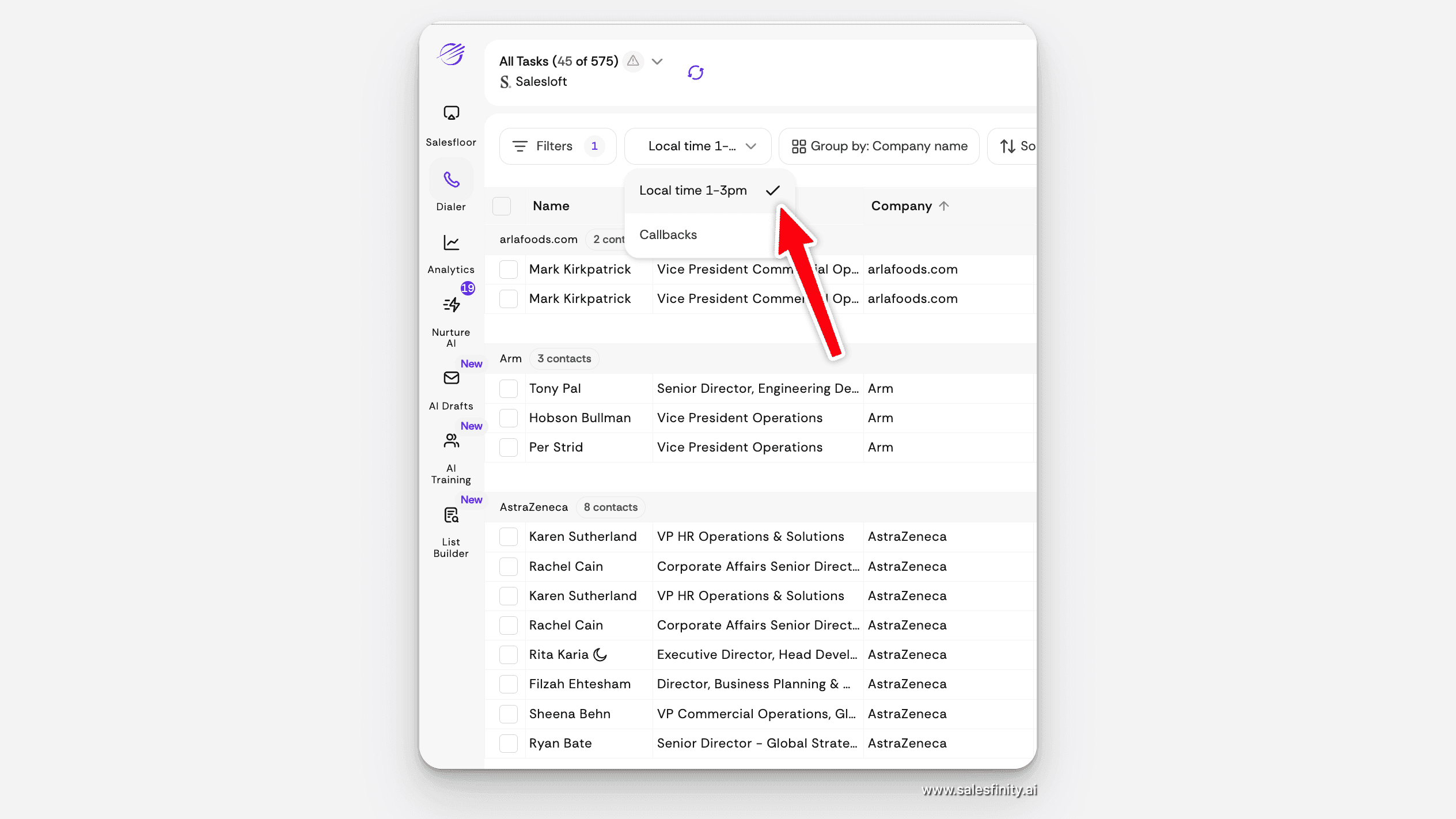
Filter Presets let you save any filter combination with a single click and reload it instantly.
How Filter Presets work
Build your filter combination in the Filters panel
Click "Save preset" and give it a name
Next session, click "Select preset" from either the Filters panel or directly from your task list
Your saved filter loads instantly — you're dialing in seconds
You can save as many presets as you need. Some examples SDR teams are already using:
"Local time 11–2pm" — call during the statistically highest-pickup hours
"Callbacks" — instantly surface your callback queue
"Referral leads" — prioritize warm introductions first
Presets are also accessible directly from the task list view via the "Select preset" dropdown, so you don't even need to open the full Filters panel to switch.
Why This Matters: The Compound Effect on Connect Rates
Here's where these two features become a system, not just a feature.
Salesfinity already provides connect rate analytics that show you which hours, days, and time windows generate the highest pickup rates for your team. That data has always been available — but acting on it required manual effort. You had to eyeball the analytics, remember the best hours, and hope your list happened to align.
Now the workflow is closed-loop:
Analyze your connect rate data in Salesfinity's analytics dashboard
Identify your golden hours (e.g., prospects pick up most between 10 AM and 1 PM local)
Build a Local Time Filter for that window
Save it as a preset
Start every session by selecting your preset — every dial hits someone in the optimal window
This is one of those compounding optimizations. A 20% improvement in connect rate on every session, across every rep, across every week — that adds up to significantly more conversations and meetings booked per quarter.
Frequently Asked Questions
Does the Local Time Filter update in real time?
Yes. As time passes, prospects rotate in and out of your selected window. Your list always reflects the current local time for each prospect.
Can I combine the Local Time Filter with other filters?
Absolutely. You can stack it with any other filter — disposition, territory, lead source, or custom fields. Then save the full combination as a preset.
How many presets can I save?
There's no limit. Create as many presets as your workflow requires.
Do presets sync across my team?
Presets are currently saved per user. Each rep can build and save their own.
What data does the Local Time Filter use to determine local time?
It uses the prospect's location data (city, state, country) already in your Salesfinity contact records to calculate their current local time, including daylight saving adjustments.
Is this available on all Salesfinity plans?
Yes. The Local Time Filter and Filter Presets are available to all Salesfinity customers at no additional cost.
How to Get Started
Both features are live now — no setup required.
Log into Salesfinity and open any task list
Click Filters and select Local time as your filter field
Set your time window (we recommend starting with 10 AM – 2 PM)
Save it as a preset for one-click access next session
Check your Connect Rate analytics after a week to see the impact
If you're not yet using Salesfinity, you can book a demo to see how the AI-powered parallel dialer helps SDR teams connect with more prospects in less time.
The Bottom Line
The best cold callers don't just dial more — they dial smarter. The Local Time Filter and Filter Presets give every SDR on your team the ability to call prospects at the exact moment they're most likely to answer, with zero extra effort after the initial setup.
Stop burning dials on bad timing. Start calling when prospects actually pick up.
Salesfinity is an AI-powered parallel dialer that helps SDR teams increase connect rates and book more meetings. Over 1000s of SDRs across 270+ companies use Salesfinity to make cold calling faster, smarter, and more effective. Learn more at salesfinity.ai