Pickup Rate Is a System, Not a Setting: Introducing Smart Connect

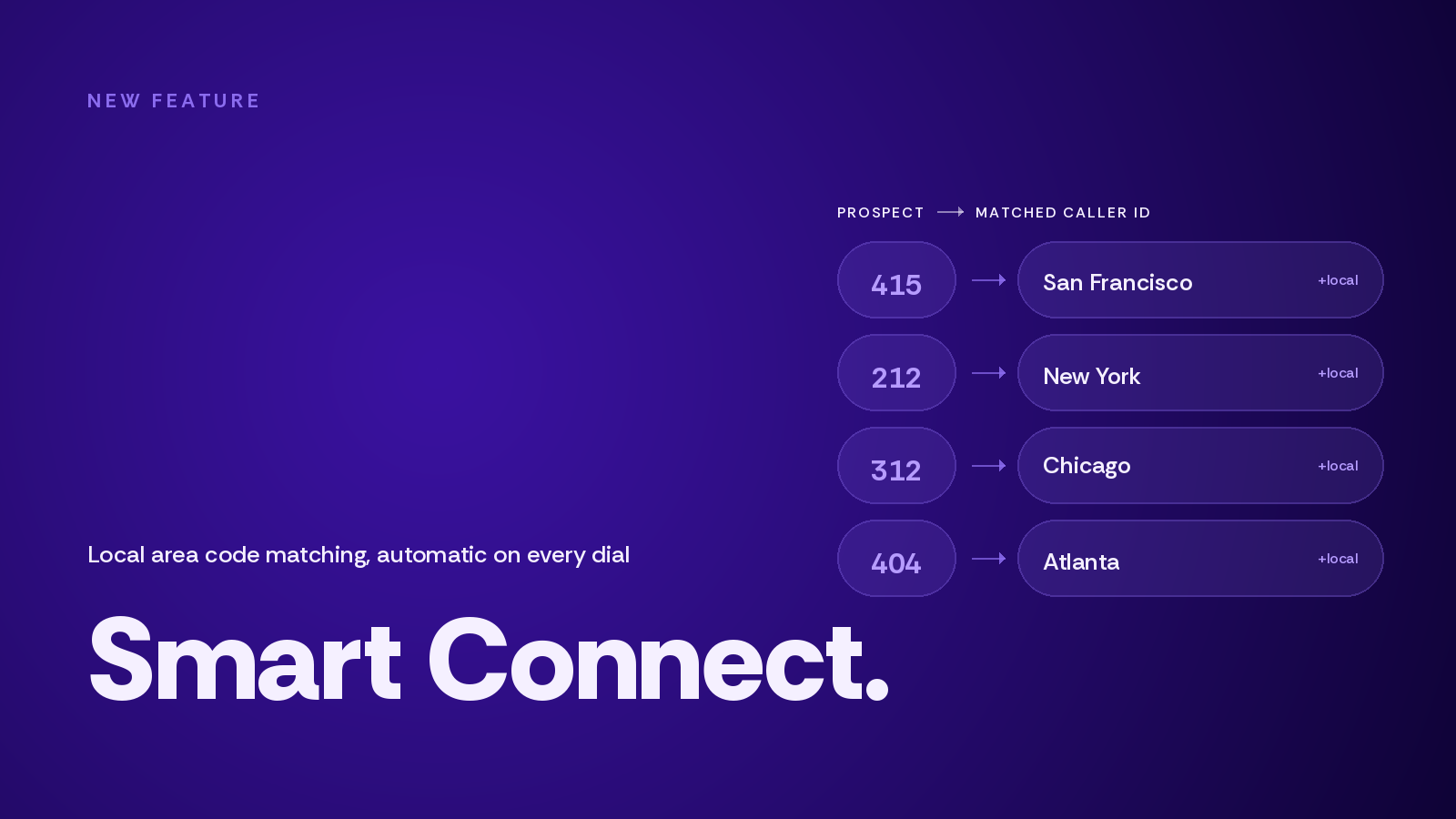
TL;DR — We just shipped Smart Connect, a proprietary local area code matching algorithm that automatically routes every outbound dial through a caller ID matching the prospect's area code. When you dial a 415 number, you show up as 415. When you dial a 312, you show up as 312. No setup, no rules, no caller IDs to swap. Smart Connect is available to every Enterprise customer starting today — turn it on in Dialer Preferences.
Smart Connect was the most-requested feature in our customer feedback inbox last quarter. It also closes the last gap in something more important: making pickup rates a system, not a setting.
What is Salesfinity?
Salesfinity is the AI-powered power/parallel dialer that enterprise SDR and BDR teams use to have more live conversations on the phone. Reps running Salesfinity typically log 8–12 live conversations per hour, compared to the 1–2 live conversations per hour that's industry-standard on a single-line dialer.
Companies including ZipHQ, Corgi, Novisto, and Amplemarket use Salesfinity to power their outbound motion. The platform integrates with Salesforce, HubSpot, Outreach, Salesloft, LeadIQ, Clay, and dozens of other tools — plus an open API, webhooks, and an MCP server for teams that want to plug Salesfinity into their own systems.
The product principle hasn't changed since day one: more conversations, less manual work, better data on what's actually moving pipeline.
The pickup rate problem nobody talks about
Before we get into Smart Connect specifically, it's worth zooming out on why pickup rates are the way they are in the first place.
If you buy a list from a major data provider — and it doesn't really matter which one, the expensive ones aren't materially different from the cheap ones — here's roughly what you're getting:
20–30% of the numbers are bad. Voids, disconnects, unreachable lines, numbers that ring forever and go nowhere.
30–40% of the list is "non-phone leads" — real numbers belonging to real people who simply don't answer phones. They might respond to email or LinkedIn, but the phone is not their channel.
That leaves 20–30% of the list as actually phone-reachable. Those are your real prospects.
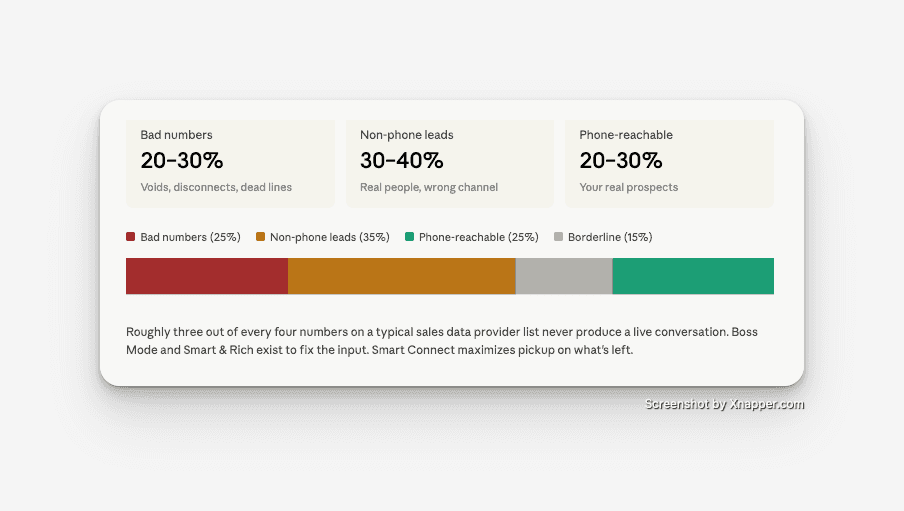
This is the math that turns into "our SDRs are dialing 100 numbers a day and only getting 6 conversations." It's not a rep problem. It's a list problem. And no amount of coaching, scripting, or motivation gets around the underlying data quality.
Smart Connect alone doesn't solve this. But Smart Connect is the third piece of a system that does.
How Salesfinity turns pickup rate into a system
Salesfinity now stacks three features that work together to systematically increase the percentage of dials that turn into live conversations.
Step 1 — Boss Mode validates the list. Before your reps ever dial, Boss Mode scans your contact list and scores every number for likelihood of pickup. It identifies which numbers are reachable, which are likely dead, and which are borderline. Customers running Boss Mode are roughly twice as likely to get pickups compared to teams dialing raw lists straight from a data provider, because the dial queue has been triaged before the day starts.
Step 2 — SmartEnrich enriches what's broken. SmartEnrich is our waterfall data enrichment tool. It takes the bad numbers Boss Mode flagged — the VoIPs, the disconnects, the dead ends — and automatically replaces them with verified mobile or direct-dial numbers from a cascading set of data sources. The list that arrives in the dialer is materially different from the list you uploaded.
Step 3 — Smart Connect maximizes pickup on every dial. Once the list has been validated and enriched, Smart Connect does the final mile. Every outbound dial is automatically placed from a caller ID matching the prospect's area code. The number that shows up on their screen looks local, which materially shifts the answer-vs-decline decision in the two seconds before voicemail.
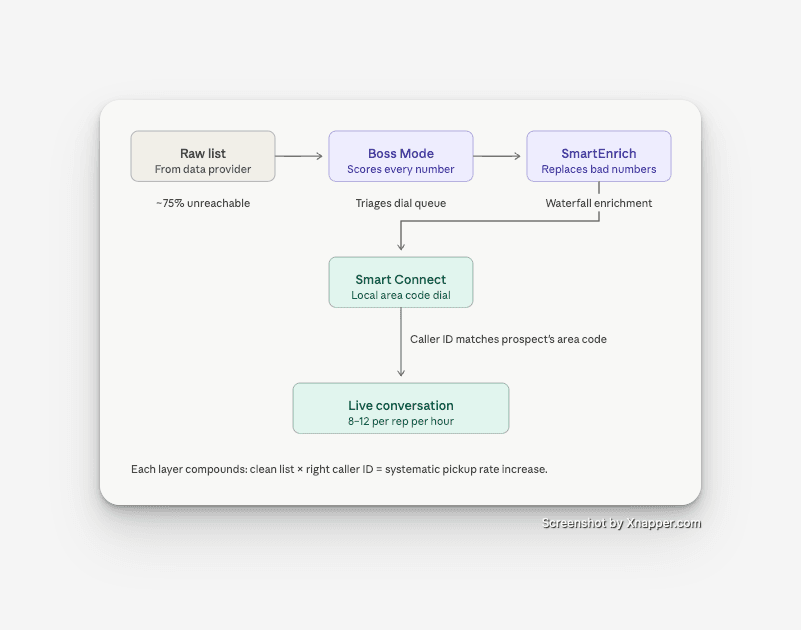
Each step compounds on the one before it. A clean list with bad caller IDs underperforms. A dirty list with perfect caller IDs underperforms. The combination is what produces the pickup rates our top customers are running.
What Smart Connect actually does
Smart Connect is automatic local area code matching for outbound calls. The mechanics are simple:
When a rep places a dial, Smart Connect inspects the destination number, identifies the area code, and routes the call through a matching caller ID from your account in real time. The match happens silently — between the moment the rep clicks dial and the moment the call connects.
If your account doesn't have a caller ID for that exact area code, Smart Connect falls back to the nearest geographic match, then to your default caller ID. Reps are never left without a working number.
It works across every dialing surface in Salesfinity — parallel dialer, single-line power dialer, click-to-call, and sequence-initiated dials. It respects existing caller ID compliance settings, country code matching, and DNC configurations. It's not a separate routing layer; it's an intelligent default applied within your existing setup.
For administrators with regulated-industry compliance requirements, Smart Connect can be overridden at the campaign or sequence level when a specific outbound presence is required.
What this looks like for international teams
Smart Connect is built for US and Canada outbound, where area codes carry strong local-presence signal.
For teams dialing internationally, Salesfinity also supports Country Code Matching — the same principle, applied at the country level. Calling Germany from your EMEA team dials out from a German number. Calling the UK dials out from a UK number. Calling France from France. The local-presence advantage scales globally without your reps having to think about it.
Country Code Matching is already live for international customers and works alongside Smart Connect on accounts that mix domestic and international outbound.
How to turn Smart Connect on
Smart Connect is available to every customer on an Enterprise plan starting today.
To enable it: open your Salesfinity dashboard, navigate to Dialer Preferences, and toggle Smart Connect on. The change takes effect immediately on the next dial. There's nothing to configure, no caller IDs to upload, and no integration to set up.
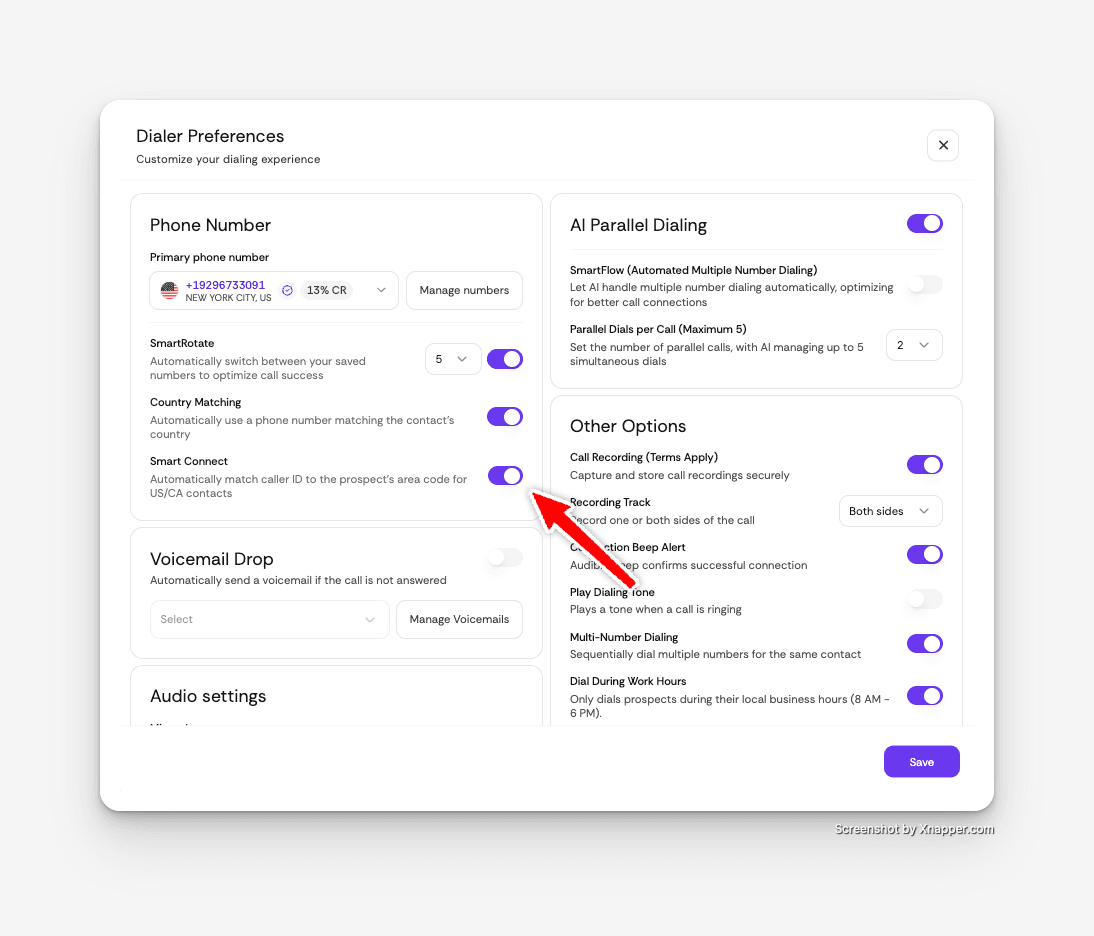
If you'd like to verify it's working, every Salesfinity call record now logs which caller ID was used for the dial — so you can audit the matching behavior across your team's call history.
What we're building next
Smart Connect made it onto the roadmap because enough of you told us to put it there. That's the feedback loop we want to keep tight, and it's why we're asking the same question now:
What should we build next?
If there's a workflow slowing your team down, a missing integration, or a feature you keep wishing existed — reply to your account manager, drop a note in the in-app feedback widget, or email hello@salesfinity.co. Every response goes to the product team. The next Smart Connect starts with one of those threads.
If you're not on Salesfinity yet, this is a good week to take a look. Booking a demo gets you Smart Connect, Boss Mode, Smart & Rich, parallel dialing, and integrations with every major sales tool — Salesforce, HubSpot, Outreach, Salesloft, LeadIQ, Clay, and the rest of the stack your team already runs on.
Frequently asked questions
What is Salesfinity Smart Connect? Smart Connect is Salesfinity's proprietary local area code matching algorithm. It automatically routes every outbound dial through a caller ID that matches the prospect's area code, increasing the likelihood that the call gets answered. It works across the parallel dialer, power dialer, click-to-call, and sequence-initiated calls.
How does Smart Connect increase pickup rates? Buyers screen unknown numbers aggressively. When the inbound number shares the recipient's area code, the implicit signal is "this is local — probably someone I should answer." When the area code is unfamiliar, the signal is the opposite. Smart Connect ensures every dial carries the local signal automatically, with no manual caller ID management.
Do I need to configure Smart Connect to use it? No. Smart Connect is a single toggle in your Dialer Preferences. Once enabled, it applies to every outbound dial automatically. There are no rules to set, caller ID libraries to upload, or routing logic to maintain.
How does Smart Connect work with Boss Mode and SmartEnrich? Boss Mode validates which numbers on your list are likely to pick up. SmartEnrich replaces bad numbers with verified mobile and direct-dial numbers via waterfall enrichment. Smart Connect then ensures every remaining dial is placed from a matching local caller ID. Together, the three features turn pickup rate into a system rather than a single setting.
What happens if my account doesn't have a caller ID for a specific area code? Smart Connect falls back to the nearest available geographic match, and ultimately to your account's default caller ID. Reps are never left without a working number.
Does Smart Connect work for international outbound? Smart Connect itself is optimized for US and Canada outbound, where area codes are the primary local-presence signal. For international teams, Salesfinity supports Country Code Matching — calls to Germany dial out from a German number, UK calls from a UK number, and so on. Both features can run together on accounts with mixed domestic and international outbound.
Which Salesfinity plans include Smart Connect? Smart Connect is available to all customers on the Enterprise plan starting today, at no additional cost.
Does Salesfinity integrate with my CRM and sales engagement tool? Yes. Salesfinity has native integrations with Salesforce, HubSpot, Outreach, Salesloft, LeadIQ, Clay, and dozens of other platforms. It also offers an open API, webhooks, and an MCP server for custom and AI-agent-driven workflows.
How many live conversations per hour can SDRs expect on Salesfinity? Reps typically run 8–12 live conversations per hour on Salesfinity, compared to 1–2 conversations per hour on a single-line dialer. With Smart Connect, Boss Mode, and SmartEnrich enabled together, customers see meaningful additional improvements over that baseline.