Introducing Live Assist: Real-Time Call Coaching From a Playbook That Updates Itself


The short version: Live Assist is a real-time sales coach inside the Salesfinity dialer. The moment a prospect pushes back, the edges of the rep's screen light up and one short line to say appears under the call bar, pulled from your own battle cards. Pair it with a scheduled Ari job that reviews yesterday's calls and updates those battle cards, and your best talk tracks reach every rep on the next dial, without another training session.
A real call on our own account. Our founder dials his own phone and plays the prospect: "We are all set with our current dialer." This is what the rep's screen does next.
Why we built Live Assist
If you manage SDRs, you already know where cold calls are won and lost. It is the few seconds after a prospect says "not interested", "we already have something" or "send me an email". Your best rep has an answer ready. Your newest rep freezes, and the call is over.
The usual fixes all arrive too late:
Call reviews happen the next day, after the meeting is already lost.
Training sessions fade by the next call block.
Battle cards hold the right answer, but nobody opens a doc in the middle of a live conversation.
You can only sit in on one call at a time.
Live Assist moves the coaching into the call itself. And because it reads your team's battle cards, it also gives you a new way to roll out what works: change the card, and the whole team has the new line on the very next call.
Your best talk tracks, rolled out on autopilot
This is the part SDR managers ask about first. Live Assist reads your battle cards at the start of every call. So whatever is in those cards is what your reps see when a prospect pushes back. That makes battle cards the fastest training channel you have, and Ari, your AI teammate in Salesfinity, can keep them current for you.
Your reps make their calls. Salesfinity records them and keeps the transcripts and outcomes.
A scheduled Ari job reviews the previous day's calls. It looks at which objections came up most, which answers kept the prospect talking, and which ones ended the call.
Ari updates your battle cards with what worked.
On the next call, Live Assist puts the updated line on every rep's screen, at the moment they need it.
Setting it up takes one message to Ari. For example:
Every day at 7am, review yesterday's connected cold calls. Find the objections that came up most and the answers that led to a meeting or a referral. Update our battle cards with what worked, and tell me what you changed.
You decide how much Ari can change on its own. Set the job's permission to Manual and Ari asks before every battle card edit. Set it to Auto approval and it updates the cards without asking. Either way, each run is listed under Ari's jobs, so you can open it and see exactly what it did.
The result is a loop that used to take a manager hours every week: listen to calls, spot what works, rewrite the playbook, retrain the team. Now the review runs every morning, and the rollout happens on the next dial. Scheduled jobs are available on plans that include Ari.
What your reps see on a live call
Live Assist listens to both sides of a connected, recorded call. When the prospect raises an objection, names a competitor, asks a question or shows a buying signal, the rep gets:
One short line to say, big enough to read at a glance, right under the call bar.
A follow-up, labeled Then, for the next thing to ask.
A glow around the edges of the screen, so the line is hard to miss. It is violet for a pushback and green for a buying signal.
The source of the line, such as the name of the battle card it came from, so reps and managers know why it was suggested.
Once the rep starts answering, Live Assist steps back. The glow stops, the line shows You're on it, and a few seconds later it tucks itself into the Live Assist card. Reps can also press Esc to dismiss a line.
The lines come from your own material, in this order: your team plays, then your battle cards, then your call framework. Only when none of those fit does Live Assist fall back to general guidance, and that line is labeled so nobody mistakes it for your playbook. It does not make up customers or numbers. A line that quotes a number that is not in your material or in the call is dropped before the rep ever sees it.
Every call steers toward an outcome you define
Not every good cold call ends in a booked meeting. Sometimes the right outcome is a referral to the person who owns the problem, or a follow-up at a better time. Live Assist calls these completions, and you decide which ones count for your team.
It starts with six: Meeting booked, Qualified, Referral, Follow-up set, Info gathered and Disqualified. Edit them or add your own, each with when it applies and how to get there. Live Assist then steers every suggestion toward the completion that fits the person on the line.
In the clip above, the prospect says he is not the right person and there is no budget. The line Live Assist gives the rep comes from the team's battle card for that objection: "Got it, you're not the right person. Who usually owns this on your side?" The prospect names the team that does, and the call is marked Completion · Referral.
Nudges while they talk, and a checklist that ticks itself
Alongside the suggested lines, Live Assist watches how the conversation is going and gives small tips when a rep needs one:
Slow down when the rep is talking too fast.
Let them talk when the rep's share of the conversation gets too high.
Let them finish when the rep keeps talking over the prospect.
Pause and ask a question after a long monologue.
Let the question land when the rep asks something and keeps going.
You set the threshold for each tip, and how often tips may appear. Your team's must-do checklist also ticks off live as the rep covers each item, with a reminder before they hang up if something is still open. The checklist can be the same one you already use for call scoring.
A recap the second the call ends
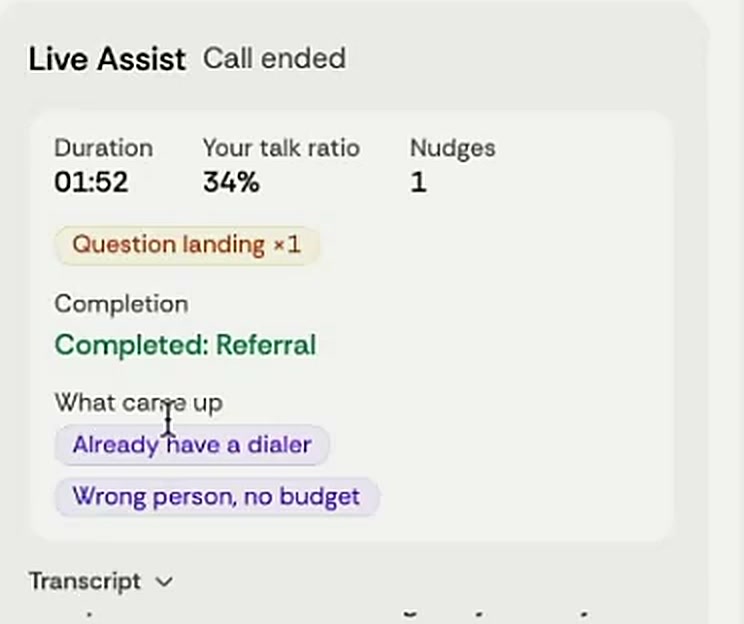
When the call ends, the Live Assist card turns into a short recap: how long the call ran, the rep's talk ratio, the nudges they got, the completion they reached, every objection that came up and how many must-dos they covered. The rep sees what happened while the call is still fresh, not in a review the next day.
Set it up once for the whole team
Owners and admins control Live Assist in Settings → Coaching → Live Assist. Click Change and you will find six sections:
On screen. Choose how a line reaches the rep: Glow and line, Line only, or Card only. Set how long the glow and the line stay.
Call framework. Your objective, your pitch (your company, the customers you can name and what you help with), your completions and your call flow. The default flow has nine steps, from confirming the name to asking for the meeting.
When to interrupt the rep. The tips above, each with its own threshold.
Suggest what to say. Turn help on or off for objections, competitors, questions and buying signals, and set how long a line can be.
Team plays. Your own rules: when the prospect says this, suggest saying that. These come before battle cards.
Must-do checklist. Use the same list as your call scoring or write a separate one.
Reps add the Live Assist card to their dialer with Add card, or an admin can add it for everyone in the Card Layout tab. The glow and the line work even without the card. Each rep can also switch Live Assist off for themselves in their dialer preferences.
What this changes for SDR managers
Coaching happens during the call, not in the review the day after.
A new rep gets your best answer on their first call, instead of having to learn it from old recordings.
There is one place to change the talk track. Edit a battle card or a team play, and it is on every rep's screen on the next call.
You define what a good call is. Completions and call flow are yours, and every suggestion steers toward them.
The playbook keeps up with the market. With a scheduled Ari job, your battle cards are updated from real calls, not from memory.
How to get Live Assist
Ask your CSM to turn on Live Assist for your team. It is included in every Enterprise license.
Open Settings → Coaching → Live Assist and choose how it shows up on screen.
Add your pitch, your completions and your call flow, or start from the default framework.
Have your reps add the Live Assist card to their dialer and make a call. Live Assist runs on recorded calls, once a person answers.
Already a customer? Ask your CSM for access. Not using Salesfinity yet? Book a demo and we will show you Live Assist on a real call.
Frequently asked questions
What is Live Assist?
Live Assist is a real-time sales coach in the Salesfinity dialer. It listens to a live call and, when the prospect pushes back or shows interest, shows the rep one short line to say. It also gives talk tips, tracks a must-do checklist, and writes a short recap when the call ends.
Where do the suggested lines come from?
From your own material first: team plays, then battle cards, then your call framework. If nothing fits, Live Assist gives general guidance and labels it as such. Every line shows its source.
Will it make up numbers or customer names?
No. Live Assist only uses numbers and customers that appear in your own material or in the call. A line that quotes anything else is dropped before the rep sees it.
How do my battle cards stay up to date?
You can edit them yourself at any time, or give Ari a scheduled job to review recent calls and update the cards with what worked. You choose whether Ari asks for approval before each change. Scheduled jobs are available on plans that include Ari.
Does it work on every call?
Live Assist runs on recorded calls in the Salesfinity dialer, and it starts when a person answers. Calls you do not record do not get Live Assist.
Can a rep turn it off?
Yes. Each rep can switch Live Assist off in their dialer preferences. Managers choose how it appears for the team: with the glow, as a line only, or only inside the card.
Does it replace call scoring?
No. Call scoring grades a call after it ends. Live Assist helps during the call. They work together: the must-do checklist in Live Assist can be the same list your scoring uses.
How do I get it?
Live Assist is included in every Enterprise license. Ask your CSM to turn it on for your team.