Introducing Pages & Decks: Follow-Ups That Tell You When to Call


The short version: Pages & decks is live: right after the call, ask Ari, your AI teammate in Salesfinity, for a follow-up page or deck, or set up a job once and it's made after every call. Send each person their own link, and as soon as they start reading, Ari messages you in Slack, with a button to call them if they're in Salesfinity with a number. Pages & decks then shows how long they read and where, so your next call starts with what they cared about.
Maya asks Ari for a recap page, sends it to Dana, and calls her from Ari's Slack message. All names are made up.
No more "did you get a chance to look?"
You finish a good discovery call, send the recap, and it disappears. Did Dana read it, forward it to her CFO, or never open it? You can't tell, so days later you call cold and ask the question every rep hates.
Pages & decks tells you who's reading and when. And because Ari lives where you make your calls, the ping comes with a button to call while your page is on their screen.
How it works
Here's one morning with Dana, from the discovery call to the call back.
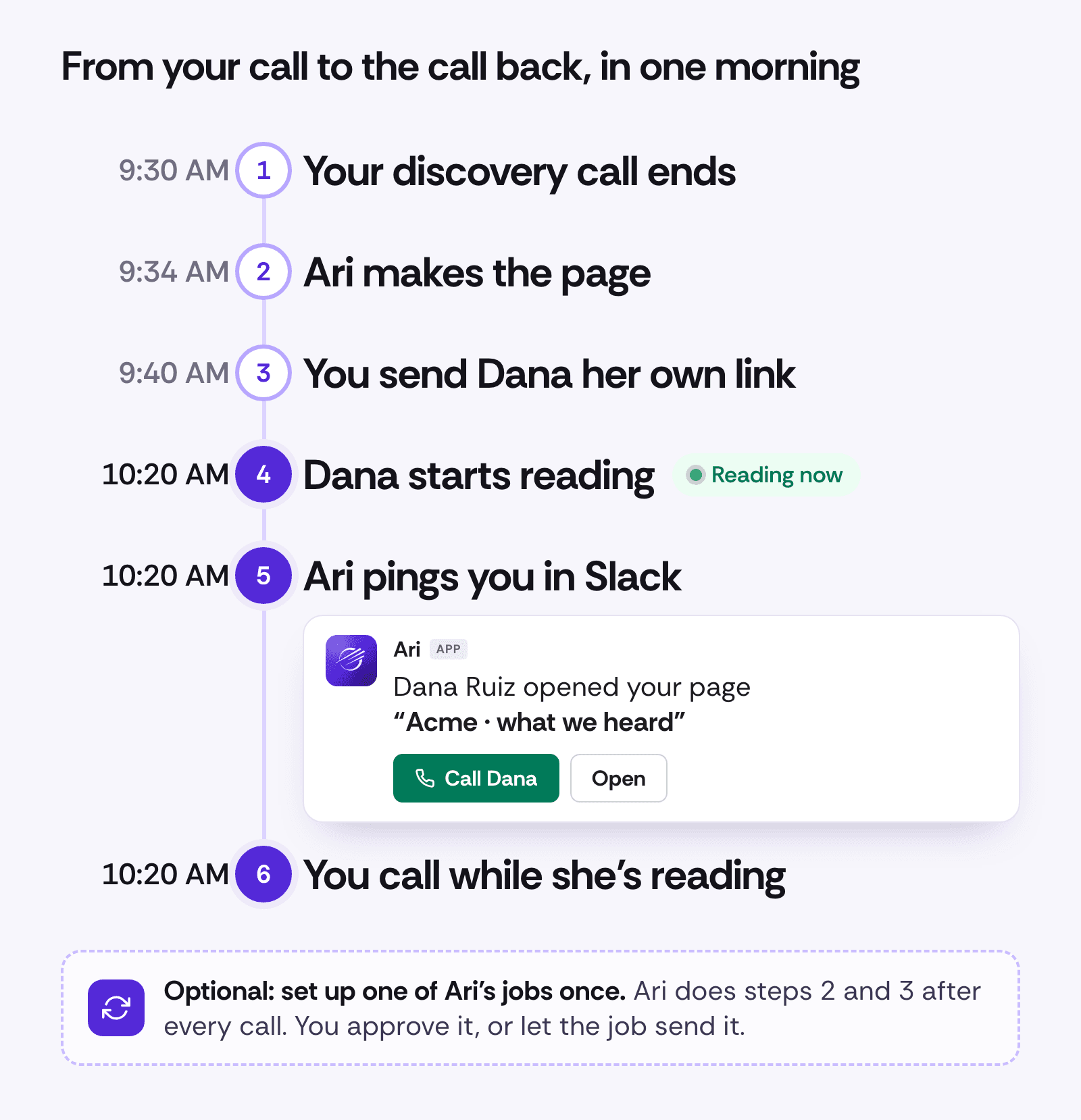
1. Have the call
Ari works from what was said: calls in the Salesfinity dialer, Gong calls if Gong is connected, your notes and files you attach. For a Zoom or Meet call that isn't in Gong, add a line of notes when you ask.
2. Ari makes the page
Open Pages & decks, click + New, and ask for a page (a web page that reads well on a phone) or a deck (slides). Ari builds it while you watch. The quickest start is the Call recap card:
Make a page for Dana Ruiz that recaps our call today and confirms our meeting on Thursday.
A deck builds slide by slide, flags one number To check, and downloads as PowerPoint or PDF.
On a page, click any text to change it; on a deck, ask Ari. Decks have 12 slide layouts, speaker notes and Present. Any number Ari typed itself is marked To check, for you only. Your card goes on everything you share, in your team's brand, with Book a time if your calendar link is on your profile.
3. Send it to Dana
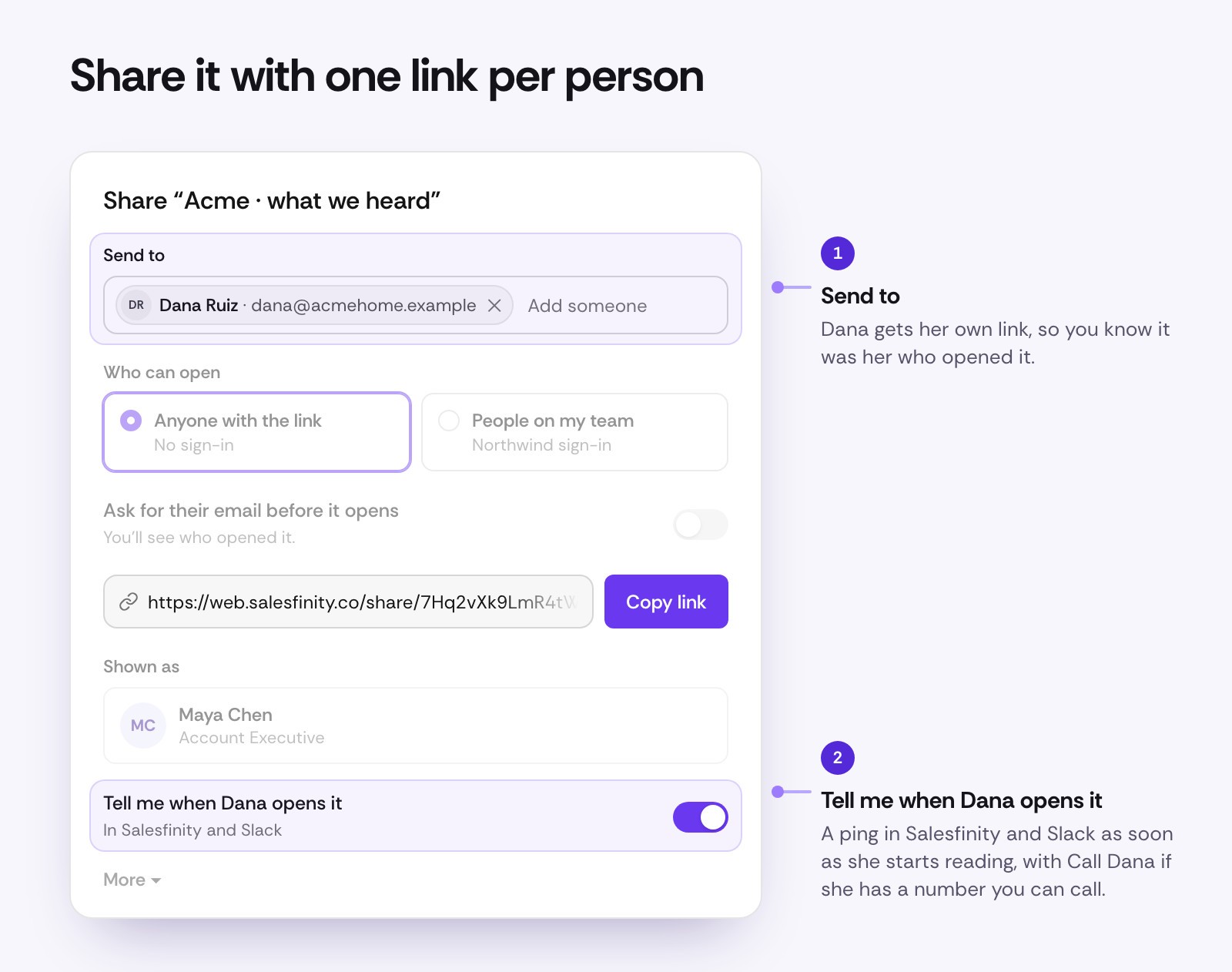
Click Share and add Dana under Send to. She gets her own link, with Tell me when Dana opens it already on. Send it from your own email, or ask Ari to draft one; Ari can send from your connected Gmail, and by default it asks you first. Docs and lists you share from Ari work the same way.
4. Dana starts reading
Dana opens her link, with no sign-in. Once she scrolls, clicks or taps, she counts as reading.
5. Ari pings you
As soon as she starts reading, Ari messages you in Slack: Dana Ruiz opened your page "Acme · what we heard", with Call Dana and Open. Later visits say so, like (3rd time). In Salesfinity, a notice pops up with Call and Open. You get at most one ping per person every 30 minutes.
Ari's messages for Dana's three visits. Call Dana opens the dialer with her loaded.
6. Call while she's reading
Call Dana opens the Salesfinity dialer on her while your page is still on her screen. In the app, Call dials after a 3-second countdown you can cancel. The button shows when Dana is in Salesfinity with a number you're allowed to call.
Then see what she cared about
The rest is in Pages & decks, under Outreach. While Dana reads, her row says Dana is reading now, and Ari's line on top has Call Dana: Dana Ruiz is reading your page "Acme · what we heard" right now: 3rd visit, mostly pricing.
Dana's row turns to reading now, her visits and time per section show, and Call Dana dials.
Open the page for Who opened it: each visit and how long it lasted. Where Dana spent time shades each section of a page, or slide of a deck, by how long she spent there.

So your next call skips "did you get a chance to look?" and starts with pricing.
Do it after every call with Ari's jobs
A job makes the page and the email after a meeting, then waits for Maya to approve.
To skip even the asking, set up an Ari job once. It runs each time a meeting with someone outside your company ends on your calendar, or you log a call:
When a discovery call ends, make a recap page for the prospect and draft the email with their link.
Ready-made jobs like Recap my meetings already draft the follow-up email; add "make a page for them" to get the page too. By default, Ari asks before a link or an email goes out; set the job to Skip all permissions and it sends on its own.
Seven follow-ups to try this week
Each comes with words to type to Ari.
A recap page after a discovery call
For AEs, minutes after the call. On Zoom? Add notes:
Make a page for Dana Ruiz that recaps our call today and confirms our demo on Thursday. Notes: 3 locations, techs double-booked, wants it live by March.
Why the open matters: call while she's reading. Back a third time, mostly on pricing? Build Thursday's demo around pricing.
A short page when a cold call ends with "send me some info"
For SDRs, when Leo says "just send me something":
Leo asked for info. Make him a short page from our call just now and draft the email with his link.
Why the open matters: Call Leo while it's on his screen, not two days later. No open? He was brushing you off, and it didn't cost you a dial.
A page that confirms the meeting
For whoever booked it, the same day:
Make a page for Dana that confirms Thursday's demo: the agenda, who's joining from our side, and what to have ready.
Why the open matters: not opened the day before? Call to reconfirm, before it turns into a no-show.
A business case your champion takes to the CFO
For AEs, when your champion needs her CFO's yes:
Make a business case deck for Dana to take to her CFO, from our call today. Use our numbers where you can.
Send Dana her own link, plus a link without a name for her to pass along (see the FAQ). Why the open matters: tom@acmehome.example opened your deck "Northwind for Acme Home Services" · typed it in means it reached the CFO.
A pricing page with a simple calculator
For AEs, once pricing comes up:
Make a page for Dana with our pricing for 3 locations and a simple calculator for hours saved a week.
Why the open matters: minutes on Pricing? She's weighing it, so call. Seconds on Pricing and minutes on the plan to go live? The question is timing. (You don't see what she types into the calculator.)
A "what we heard" page for a deal that went quiet
For AEs, two weeks into silence:
Dana's gone quiet. Make a short page with what we heard on our calls and one simple next step.
Why the open matters: an open after two weeks of silence is your reason to call today. No open? Try someone else at Acme.
A quarterly review deck for account managers
For account managers, with the usage sheet attached:
Make a QBR deck for Acme's review next week. Use this sheet and add a slide on next quarter's goals.
Why the open matters: send each attendee their own link, and walk in knowing who read it and which slides they cared about.
What this changes for your team
Call when interest is highest, while your page is on their screen.
Catch a no-show early: no open by the day before means call and reconfirm.
Open the next call with what they cared about.
See when it reaches the person who signs, with a link without a name that asks for their email.
Never skip a follow-up on a busy day, with an Ari job.
See the team's follow-ups. Team lists your team's latest 100 pages, decks and docs, who made each and how often it was opened; owners and admins can open any to see Who opened it.
What counts as a read
We'd rather show you fewer opens you can trust:
A reader counts after about 3 seconds on screen and a scroll, click or tap. Link previews, email scanners and bots never count.
Time counts only while the page is in front of them and they've scrolled, clicked, tapped or typed in the last minute.
Reading now means they read in the last 45 seconds.
Your teammates never count.
How to start
Open Pages & decks, under Outreach, and click + New.
Ask for a page or a deck, or pick Call recap.
Check anything marked To check, then click Share.
Add your prospect under Send to and send the link.
When the ping comes, click Call.
For pings in Slack, an owner or admin connects Ari to Slack once in Settings › Ari. Until then, pings show in Salesfinity.
Already on Gold, Enterprise or Enterprise Plus? Open Pages & decks and make your first page. Not using Salesfinity yet? Book a demo and we'll show you a follow-up that tells you when to call.
Frequently asked questions
Who gets Pages & decks?
Gold, Enterprise and Enterprise Plus licenses, as part of Ari.
Does it use credits?
Making a page or deck uses Ari credits. Opening, downloading, sharing and seeing who opened it don't.
Where do I see how long they read?
In Pages & decks, under Who opened it on the page or deck. The Slack message says who opened it and how many times.
Does my prospect need to sign in?
No. Links open without a sign-in. You can also make a link only your team can open.
What if they forward it?
A link you sent to Dana counts as Dana, even when forwarded. For a link she can pass along, turn on Ask for their email before it opens and copy a link without a name (under More). Whoever opens it types a work email first and shows up as that email, marked "typed it in". The email isn't checked.
Can I change it after I send it?
Yes. On a page, click any text; on a deck, ask Ari. Your changes show on the same link.
Can I download a deck as PowerPoint?
Yes. Click Download and pick PowerPoint (.pptx) to edit it in PowerPoint or Google Slides, or PDF. Readers can download a PDF only if you turn on Let them download a PDF under More when you share.