Org Chart: Multi-Thread Accounts From Inside the Dialer


TL;DR: Salesfinity now builds an org chart from your HubSpot or Salesforce contacts the moment you open a contact in the dialer. You see everyone at the account, filtered by seniority, with every past touch on the card. Call, email, or sequence anyone from there. No list building. No tab switching.
The problem with dialing one name at a time
Most cold calling is single-threaded by accident.
A rep pulls a list. The list has one contact per company. They dial it. No answer. They mark it, move on, and the account goes back into the pile.
Nobody decided to work the account that way. It's just what the list looked like.
Meanwhile, the same company has a director who picked up for a teammate two weeks ago, a VP nobody has touched, and a manager who said "not now" in May. All of that lives in the CRM. None of it is visible when the rep is dialing.
Multi-threading is supposed to fix this. In practice it means opening HubSpot in another tab, searching the company, scrolling contacts, checking activity on each one, and coming back to the dialer. Reps don't do that between dials. They can't. It takes longer than the call.
So the account stays single-threaded, and the pipeline depends on whether one person answers one phone.
What Org Chart does
Org Chart puts the whole account next to the contact you're dialing.
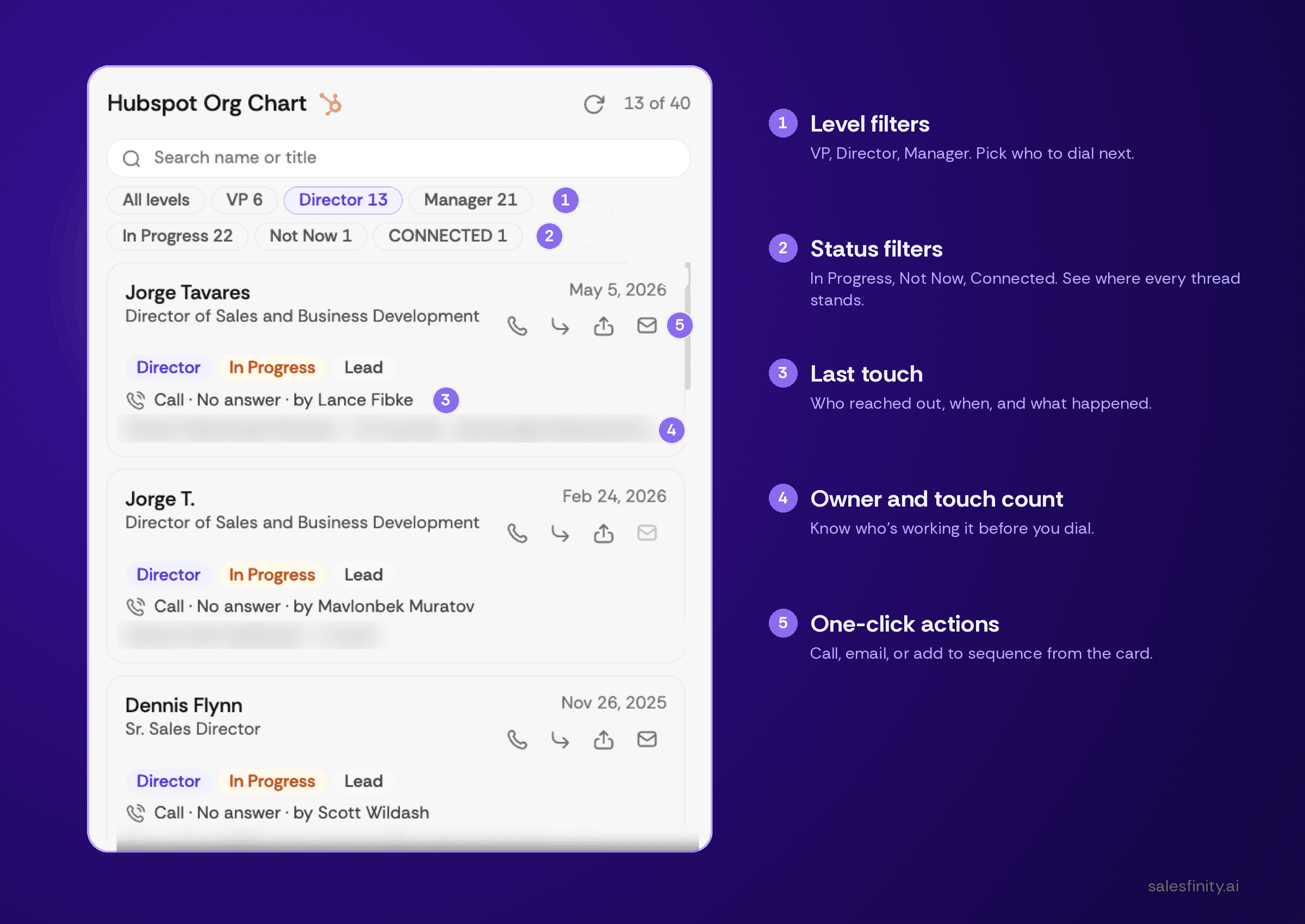
Open a contact. Salesfinity pulls every other contact at that company from HubSpot or Salesforce and builds the org chart on the spot. It sits in the left panel, beside the contact details, while you're on the call.
For each person you see:
Name and title
Seniority level (VP, Director, Manager)
Engagement status (In Progress, Not Now, Connected)
Last touch: who reached out, when, and what happened
CRM owner and total touch count
Actions: call, email, or add to sequence
It refreshes as the CRM changes. Nothing to maintain.
How reps use it
Strategic dialing by seniority
The level filters do most of the work. Tap Director and the list drops to directors. Tap VP and you're looking at the top of the org.
The practical version: the BDM doesn't pick up. Instead of marking no-answer and moving to the next company, the rep taps Director, sees Dennis Flynn, Sr. Sales Director, and dials him. Same account, different door, ten seconds later.
Account multi-threading without the research
Because the whole org is visible, reps naturally work two or three people per account instead of one. Status filters show where each thread stands. In Progress 22, Not Now 1, Connected 1 tells you the account has one open conversation and 22 people still to work.
That's the difference between "we called them" and "we're in the account."
Personalizing the opener with real history
Every card shows the last interaction. "Call, no answer, by Lance Fibke, May 5." Owner, touch count, the lot.
So the rep who's about to call the VP already knows a teammate connected with her director last week. The opener changes from "Hi, I'm calling from Salesfinity" to "Lance spoke with Jorge on your team last week about X." One is a cold call. The other is a warm one, and it took zero prep.
Staying out of each other's way
Owner and touch count are on the card. If Krish has already put 13 touches into an account, the next rep sees that before dialing. Fewer duplicate calls, fewer awkward "someone from your company already called me" moments.
Why this lives in the dialer and not the CRM
The CRM already has an org chart, or something like one. The reason it doesn't get used during calls is timing.
Reps make decisions about who to call next in the two or three seconds between dials. Anything that requires leaving the dialer loses to "next contact on the list." Org Chart works because the information is already there when the decision gets made.
That's the same principle behind the rest of the platform: the system handles dialing, filtering bad numbers, connecting on live pickup, note-taking, and logging, so the rep only handles the conversation. Org Chart extends that to choosing who to talk to.
How to turn it on
About a minute:
Open any contact and click Custom in the top right to edit your card layout.
Add CRM Org Chart and choose HubSpot or Salesforce.
Pick the fields you want on each person: title, owner, last touch, status, touch count.
From then on it builds itself for every contact you open.
Works with any HubSpot or Salesforce connection. If your CRM isn't connected yet, connect it first under Settings, then follow the steps above.
What to try this week
Run a session where every no-answer gets a second dial to someone else at the same account. Compare connect rate to a normal session.
Filter to VP on your top 20 target accounts and see how many have zero touches. That's your gap.
Before each dial, read the last-touch line on the card and use it in the first sentence.
FAQ
What is an org chart for sales calls? A view of every contact at a target account, organized by seniority and engagement status, shown to the rep while they're dialing. It lets reps pick the next best person to call and personalize the conversation with past interaction history, without leaving the dialer.
Which CRMs does Salesfinity Org Chart support? HubSpot and Salesforce. The chart is built from contacts already in your CRM and updates as your CRM changes.
Does Org Chart require setup or data entry? No data entry. Enable it once by editing your contact card (Custom → CRM Org Chart), select your CRM and the fields to display. After that it's automatic for every contact.
Can I filter the org chart by seniority? Yes. Filter by VP, Director, or Manager, or view all levels. You can also filter by engagement status: In Progress, Not Now, and Connected.
Can I call or email someone directly from the org chart? Yes. Each contact card has call, email, and add-to-sequence actions. You can move to another person at the same account without going back to your list.
Does it show who else on my team has contacted someone? Yes. Each card shows the CRM owner, the last touch (call, email, outcome, and which rep made it), and the total number of touches.
What is account multi-threading in sales? Building relationships with several people at one target account instead of relying on a single contact. It reduces the risk of a deal stalling when one person goes quiet and is one of the most consistent predictors of outbound conversion. Org Chart makes it practical to multi-thread during a dial session rather than as a separate research task.
Is the org chart available in parallel dialing sessions? Yes. It appears in the contact panel whenever a contact is open, including during live sessions.
Salesfinity is an agentic AI sales platform. The dialer filters bad numbers, connects reps only on live human pickup, and handles notes and CRM logging automatically. Org Chart is available now to all customers with a HubSpot or Salesforce connection.