Replace the Dial Tone With Your Playlist: The Salesfinity + Spotify Integration


Replace the Dial Tone With Your Playlist: The Salesfinity + Spotify Integration
Count the hours your reps spend listening to a dial tone.
A rep running parallel dials for two hours a day spends most of that time in ringing, dead air, and voicemail beeps. It's the sound of waiting. It's not a sound that makes anyone want to pick the phone back up tomorrow.
So we replaced it. Salesfinity now connects to Spotify. Your playlist plays while you dial, pauses on its own the moment a prospect answers, and resumes when the call ends. You never touch a thing.
How the Spotify integration works
Setup takes about thirty seconds.
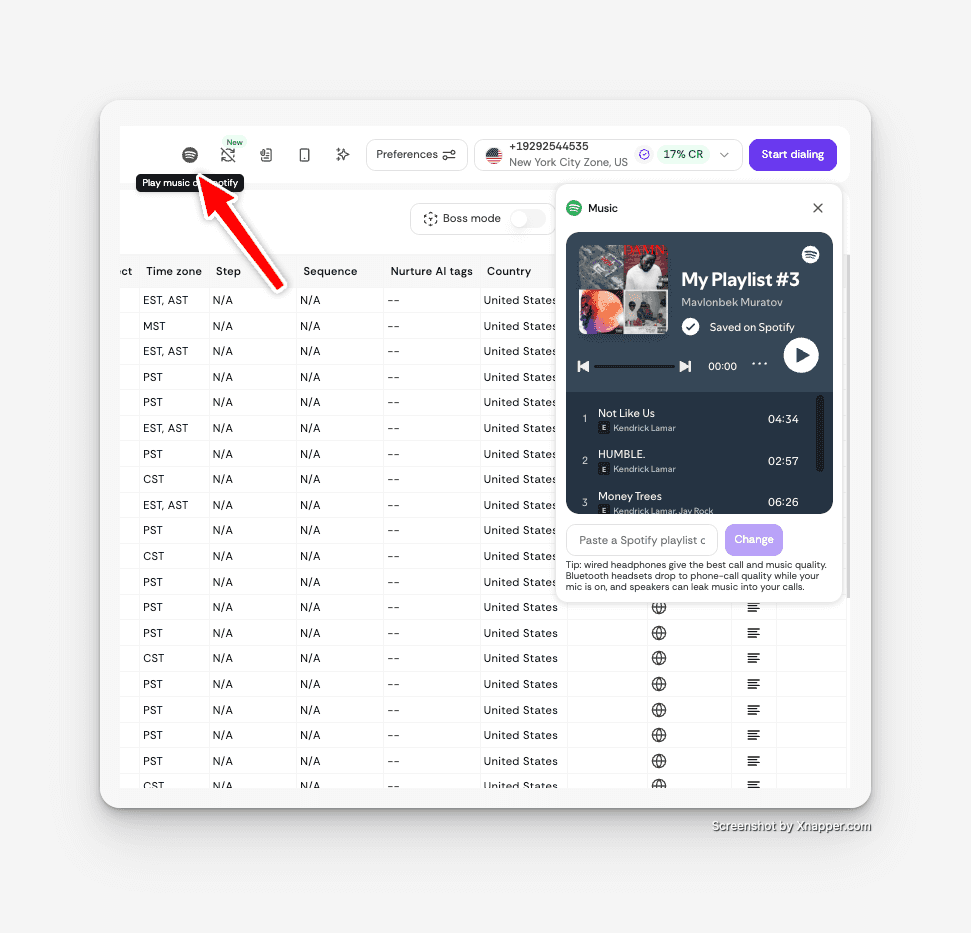
Connect Spotify to your Salesfinity account.
Paste a playlist link. Copy any Spotify playlist link, paste it into Salesfinity, and it starts playing.
Start dialing. Your playlist runs instead of the dial tone while the parallel dialer works through your list.
A prospect picks up — music pauses automatically. Salesfinity detects the live answer and pauses Spotify before you say hello.
Call ends — music resumes. It keeps playing until you pause it yourself.
The auto-pause is the whole feature
Playing music while you dial isn't new. Plenty of reps already run Spotify in another tab.
The problem is what happens when someone answers. A prospect picks up mid-chorus, and the rep spends the first three seconds scrambling for the pause button. Those three seconds are the most valuable of the entire call — it's where your tone, your opener, and your credibility all get established at once. Fumbling through them costs more than the music was worth.
Salesfinity already detects a live human in under 600 milliseconds. That detection is what makes parallel dialing work in the first place: it's how the dialer knows to route a real answer to a rep instead of dumping them into a voicemail greeting. We hooked the music to that same signal.
The pause happens before you speak. Every time. No fumbling, no dead air, no prospect wondering why they can hear a bassline.
Why music belongs on a dial session
Cold calling is a volume game, and volume games are won by whoever can keep going.
The hardest part of a dial session usually isn't the talking. It's the stretch between conversations — the twelve rings, the voicemail, the hang-up, the next number. That's where energy leaks out of a session, and where reps start checking Slack.
Music fills that stretch. Gyms figured this out. Warehouses figured this out. Sales floors used to have it too, back when somebody would put a speaker in the corner and turn it up. Remote and hybrid teams mostly lost that, and nothing replaced it.
This gives it back one rep at a time, without anyone having to agree on a genre.
Getting started
Connect your Spotify account in Salesfinity, paste in a playlist, and start your next block. If you manage a team, have your reps run one two-hour session with music on and ask them afterward how it compared to a normal one.
You won't get a clean metric out of that, and we won't pretend otherwise — energy on a sales floor has never been easy to measure. But most managers can tell the difference between a team grinding through a list and a team with some life in it.
Salesfinity exists to be the fastest way to go from outreach to revenue. Usually that means removing friction from the workflow. Sometimes it just means making the work feel better to do.
Frequently asked questions
How does the Salesfinity Spotify integration work?
You connect your Spotify account to Salesfinity and paste in a playlist link. The playlist plays while you dial, pauses automatically when a prospect answers a call, and resumes once the conversation ends.
Does the music pause automatically when a prospect answers?
Yes. Salesfinity detects a live human answer in under 600 milliseconds and pauses Spotify before you begin speaking, so the prospect never hears your music and you never have to reach for the pause button.
Can prospects hear my music during the call?
No. The music pauses on live-answer detection, before the conversation starts.
Do I need a Spotify Premium account?
Playback controls through third-party integrations generally require Spotify Premium. Check your Salesfinity integration settings for current requirements.
What is a parallel dialer?
A parallel dialer places outbound calls to multiple contacts at the same time, filters out voicemails and dead lines, and connects a rep only when a live person answers. That same live-answer detection is what triggers the Spotify auto-pause.
Can I still control playback manually?
Yes. You can pause, resume, or change your playlist at any time. After a call ends, the music resumes automatically and keeps playing until you pause it yourself.